On the menu this morning: first a whiny rant, then a nerdy one.
Someone pointed me at this post. Before I go into my geeky diatribe about leveraging code, a quick note: it is true that at this point Austin is working heavily on the iPhone - probably more on the iPhone than the desktop. It is also true (but not mentioned) that Laminar is investing more man power into X-Plane for the desktop now than it ever has in the past. (With the iPhone we've grown our workload with a second "front" for products, but we've increased staffing a little bit too.)
It is also true that X-Plane 9 free updates have been less frequent. This doesn't mean there's less code going into them - it just means that we're doing 4-5 months of coding and 3 months of beta instead of 2 months of codindg and 1 month of beta. I'm not sure if this is better or why it is happening (each release has to be individually planned for the circumstances) but one observation:
Given how many video cards and drivers are out there and how they react differently to the X-Plane code, I wouldn't want a beta process less than 2-3 months, because I want to know that it's had time to run on a wide variety of hardware. If our beta has to be at least 2-3 months, then a 3-month release cycle would have us in beta all the time!
My whiny rant (the short version) is this: Laminar Research isn't in a position (as a company selling a product) to post all of the details of how our business operates internally. So posts that say "Laminar should do X" (where X is a business decision) drive me a bit nuts, because I can't post a reasonable reply.
Now here's my real point: development for the desktop and the iPhone are not a zero sum game. Clearly we leveraged the desktop sim to create the iPhone app. But it goes both ways; work on the iPhone also benefits the desktop.
Here is one example: when beta 8 comes out, Plane-Maker's "export to object" will a much more complete OBJ, in OBJ8 format, with animations already in place for things like wing controls surfaces!
That's a feature that people have been asking about for a while - both to make CSL objects* and as a way to save time when moving from a Plane-Maker drawn plane toa custom one. (You would first export an animated OBJ8, then start adding details in a 3-d modeling program. With beta 8, you won't have to rebuild your control surfaces from scratch.)
But...it's also a feature that is critical to the iPhone! The iPhone version of X-Plane uses animated OBJ8 files as well; this feature helped us internally to prepare planes for the iPhone version, but it's also a requested feature from our authors.
So my response to those who say that the iPhone has taken away from X-Plane development is that it is not true - not only because we are developing more heavily for the desktop, but because sometimes iPhone development is for the desktop.
* I do not remember whether the current compiled versions of libXplaneMP use OBJ7 or OBJ8 objects. Since libXplaneMP uses the OBJ code from XPTools, it should be (relatively) straight forward to update libXplaneMP and the clients that use it to use OBJ8 directly. In the meantime, you can use ObjConverter to convert an exported OBJ8 back to OBJ7 for CSL use.
Friday, April 03, 2009

Wednesday, April 01, 2009
Scenery Tools Progress? Yes.
I've been hacking at the scenery tools over the last few days...and I think we're making some progress. I mention this because it can be hard to see the work getting done - there is nothing for months, then a new version of a tool. (Well, now you can watch the code change as it happens. If you don't think this like watching paint dry, you might be a geek!) I also mention it because two of the biggest improvements aren't my own - they're insanely helpful user contributions.
The AC3D Plugin
Version 3.2 is now in beta. Version 3.2 catches the plugin up with all of the latest OBJ tricks, including dataref-controlled LIT levels, manipulators, hard surfaces, etc. This might be more useful for airplane modelers than scenery modelers, but I think the variable _LIT channels can be used for some interesting scenery effects too.
WorldEditor
WED 1.1 will go beta once X-Plane 930 is out of beta, and will feature (very primitive) overlay editing. It's not a thing of beauty (yet) - the overlay editing features are leaner than the airport editing tools were. But 1.1 will allow you to edit an overlay and airport in one workspace.
I can tell you now that the area where WED 1.1 is weak is preview. But I don't want to hold off the ability to edit overlays in WED "at all" just because it's not as nice as it could be (and someday will be).
It should be possible to work on an overlay project in both WED and OverlayEditor - for example, you could build a taxiway layout in WED, using the overlay capabilities for custom pavement and lines, but use OverlayEditor to place 3-d objects (with a 3-d view).
MeshTool
To be blunt, MeshTool in its current form is really hard to use. Part of that is expected - MeshTool is a "back-end" tool like DSF2Text, aimed to simplify the problem of creating base a base mesh for some other program. But even as a back-end, MeshTool is difficult to use because it has bugs in its polygon processing, which often result in cryptic and hard-to-diagnose crashes when used with even relatively simple input data.
The good news is that I have my base mesh generation code running with a new polygon processing library (CGAL) - the switchover from my old buggy code to CGAL was done by Andrew and contributed back as a patch. I've been throwing all sorts of weird data at the polygon cutting algorithms and they are rock solid.
The mesh generation code is part of MeshTool, so the next build of MeshTool will feature these processing improvements. That's where Janos' extensive work on the build environment comes in - he's basically turned the scenery code from a big pile of my mad ramblings into a sane multi-platform project. This will mean a much simpler, faster process for releasing tools, particularly on Windows and Linux.
(Previously once I got a tool working, I would have to waste a few days trying to get the code to work on Windows too, slowing the whole process down.)
I expect to recut the "scenery tool" pack (that is, MeshTool, DSF2Text, and all of those other smaller apps) some time during WED beta, after 930 goes final. If all goes well, there should be native versions of the command-line tools for Linux.
MeshTool Needs a UI
Fixing MeshTool's polygon processing is necessary, but not at all sufficient to make it a useful tool; to be really useful, it needs a real user interface. I think there are two strong possibilities for this:
- WED could develop base mesh editing. Under this scheme, you would be able to draw land use polygons in WED and create a "DEM" object for the elevation.
- MeshTool could be an output option for QGIS (via some kind of plugin or script).
Tuesday, March 31, 2009
The New Ac3d Export Plugin (Beta 1) - You Must Update Your .AC file!
I just posted the new X-Plane AC3D plugin (3.2 beta 1). For the info, please subscribe to the x-plane-scenery yahoo mailing list. I will post links on the scenery website once the plugin has undergone more testing; during early beta I only need a few testers to tell me I broke things.
Please read the README that comes with the download completely!
An important note for anyone using an existing .ac file to make airplanes with panels:
The new plugin gives you direct control over manipulations. But older .ac files don't have the manipulator set on any of the objects. Thus if you export your airplane, your panel texture will work, but the panel will not be clickable.
To fix this, for each object in the hierarchy that has panel texture, select the object, open the X-Plane Object Properties... dialog box, and change the manipulator from "None" to "Panel". (If you don't see this option, make your properties window a bit taller.)
Note that if you don't need your panel to be clickable, setting the manipulator to "none" is slightly faster in X-Plane 930 and a lot faster in X-Plane 922.
Other details: you'll need the Commands.txt and DataRefs.txt file from X-Plane's Resources/plugins folder.
Panel sub-regions are now handled quite a bit differently - please be sure to read the README completely. If you were using the 3.1 plugin with panel regions, you may need to update your .ac file a bit.
Please read the README that comes with the download completely!
An important note for anyone using an existing .ac file to make airplanes with panels:
The new plugin gives you direct control over manipulations. But older .ac files don't have the manipulator set on any of the objects. Thus if you export your airplane, your panel texture will work, but the panel will not be clickable.
To fix this, for each object in the hierarchy that has panel texture, select the object, open the X-Plane Object Properties... dialog box, and change the manipulator from "None" to "Panel". (If you don't see this option, make your properties window a bit taller.)
Note that if you don't need your panel to be clickable, setting the manipulator to "none" is slightly faster in X-Plane 930 and a lot faster in X-Plane 922.
Other details: you'll need the Commands.txt and DataRefs.txt file from X-Plane's Resources/plugins folder.
Panel sub-regions are now handled quite a bit differently - please be sure to read the README completely. If you were using the 3.1 plugin with panel regions, you may need to update your .ac file a bit.
Friday, March 27, 2009
A Bit More Open Source
Thanks to Janos ("sothis" on the .org) we now have a GIT repository of the scenery tools, with public browsing of the scenery tools code.
(Non-programmers - this basically means that source code updates for the scenery tools will now be available every hour, rather than every now and then when I get around to it. The rest of this post is for programmers.)
The X-Plane tools code have always been open source, in that the LR-created code is distributed under the MIT/X11 license (which basically says "do whatever you want, don't sue us"). The public repository makes the process of getting the code a lot simpler:
- The master code is actually in CVS, but this public GIT repository is updated from CVS once an hour, so this code is very close to the latest we have.
- The full version history, tags, and other information that might be useful to a programmer are all present.
- The web interface supports online browsing of the code, as well as downloading a "snapshot" of the entire tree (as a zip, gz, or bz2 file).
(Git users will note that most of my checkin comments are really lame. This is a bad habit that comes from using CVS too much. CVS's checkin comments are per-file, not per-group, which makes them somewhat useless to search on. Typically CVS users rely heavily on tags. The bridge from CVS to git tries to group them into a single commit, which helps reveal the actions taken on the source code.)
Thursday, March 26, 2009
Standards Aren't Standards During Beta
In particular, when a new spec is being developed, during beta it may change. (During a beta of a future version, old specs won't change.)
So...please do not release non-beta aircraft and scenery based on beta builds like 930.
Here's an example: the current spec for attached objects is that the draw order is based first on lighting mode, then on the order listed in Plane-Maker.
It turns out that if we do that, polygon offset can't be used in a number of weird cases. So the rules will have to change. I'm not sure what they will change to, but the decision will be finalized when 930 is finalized.
Wednesday, March 25, 2009
Why Can't I Mark My Object As "Extreme Resolution"
I receive a number of requests from authors for an attribute to tag an object as "needs maximum texture resolution" or "needs compression disabled" or "needs maximum anisotropic filtering". The general idea is that the author wants to ensure a viewing environment that looks good.
For the most part, I am against these ideas - think of the two cases:
- If the attribute on the content is request for a relative improvement in resolution (e.g. set my object to one texture res higher than the rest of the world) then what we'll have is an arms race - every author will set their content with this flag, and the result will be that the entire sim tends to run at one res setting higher than expected. The result: users without enough VRAM will turn their res settings down another notch and all the content will look like it did before.
- If the attribute on the content is a request for an absolute setting (e.g. load this texture at the highest resolution possible) some content will simply not run on some computers that do run X-Plane.
That's a simplification of the issue - in fact I am sympathetic to the notion of differential settings - that is, we need to use more texture resolution for art elements that are closer to the viewer. The sim already improves airplane resolution a bit and cockpit resolution a lot. We set anisotropic filtering a bit higher on runways because they are viewed from a shallow view angle pretty much all the time during normal flight.
At this point I am looking at some more specific overrides for cockpit objects. In particular, modern cockpits are built out of many attached objects, and not just the "cockpit object" itself - reducing the resolution of these objects can make cockpit labels illegible.
If we do get extensions to improve resolution I can only say this: use them very, very sparingly! Adding the extension doesn't improve the user's hardware. If the user had the ability to run your airplane at extreme res without compression and 16x anisotropic filtering, he'd already be doing that!
Friday, March 20, 2009
The Mathematics of Field of View and Vanishing Points
In order to understand the vanishing point in Plane-Maker, we first have to look at field of view and the process by which X-Plane simulates a 3-d world on a 2-d monitor.
Field of View
Field of View is the angle that you get if you go from the left edge of your vision to your eye, then back up the right edge. In the case of a monitor, we can calculate this (depending on how far back I am sitting). For example, my 19" LCD is 14.8 inches across the top; to have a 45 degree FOV I need to sit about 17.8 inches away from the monitor.
X-Plane lets you set the field of view. Imagine that you were sitting in front of a window on an airplane. As you put your face closer to the window, you can see more of the world outside. Effectively you are increasing your field of view. X-Plane works the same way - turning up the field of view parameter will increase the amount of "stuff" you can see.
Where Is The Horizon?
So where is the horizon? The answer is: it depends. Assuming you are looking straight forward, the most logical place to put the horizon is exactly half-way up the monitor. And this is what X-Plane does in any external view.
As you rotate your head up and down, the center of your vision changes relative to the horizon. But if you simply move your head up and down, the horizon doesn't move. This is due to parallax. The closer an object is, the more it moves as you move your head. This is what lets me look "over" the dashboard of the car by sitting on a phone book: as my head goes higher, the dash board (close) appears a lot lower but the road (far) appears only a little bit lower. The horizon (very, very far away) doesn't move at all.
This effect works in X-Plane. Try moving the view point up and down in a plane with a full 3-d cockpit, like the Cessna 172. As you move your head up and down, your ability to see the runway out the window will change.
2-D Panels
Things get weirder when we have a 2-d panel. A 2-d panel is sort of a flat image of what a 3-d cockpit might look like. We need some kind of correlation between the 2-d world and 3-d world...that is, where does the horizon appear through this 2-d panel. That location is the "vanishing point" in Plane-Maker.
Here's where things get strange: what do we do when we scroll the panel? Do we move our head or tilt our head? The answer is: neither. Scrolling the 2-d panel simply scrolls the "window" within the 3-d world that we look through. This has the effect of moving the horizon (by the exact number of pixels the panel scrolled) without rotating your view point.
This isn't necessarily the best way to scroll the panel, but it looks pretty good, and anything we do with 2-d panels is going to be an approximation.
And Now The Bug
Of course, there must be a bug in here somewhere...these blog posts are usually the result of an investigation into an edge-case in the sim. In X-Plane 930b6, we pick a vanishing point based on the 2-d panel when we are in 3-d cockpit mode.
Why would we do such a silly thing? Originally it was to keep the horizon from jumping when there is no 3-d cockpit object. This behavior is okay in that case, but here's how we get burned: if the 2-d cockpit has to scroll, the vanishing point might be off the top of the screen. Authors who have made very large 2-d panels and separate 3-d cockpits see this as the 3-d viewpoint being stuck straight down. What's happening is the vanishing point (and thus the center for the mouse) are off the top of the screen.
For beta 7 I am fixing this:
- If there is a 3-d cockpit object, the vanishing point will be the center of the screen, which is almost certainly the right thing to do for a real fully 3-d view.
- If there is no 3-d cockpit object (but instead X-Plane's default of the 2-d panel floating in space) the vanishing point will match the 2-d view, but taking the default scroll position into account. This should keep the horizon at a reasonably sane point.
Thursday, March 19, 2009
Beta 6: Cockpit Chaos
The code that decides what parts of the plane get drawn in what views is, to put it midly, byzantine. The code evolved, and in this process became more complex and convoluted.
One of the side effects was a series of bugs that couldn't easily be fixed - typically it was a case where some new piece of code had to do some drawing, but the decisions on how to draw were being made by legacy code that had no business making those decisions.
So for beta 6 I rewrote that code.
Here's what this means: if your airplane starts showing the wrong "stuff" in various views in beta 6, please send me the plane, and a description of what it does in 922 and 930b6.
The risk is that I may have missed some of the quirkier behaviors that 922 was capable of. My goal is to have 922's behavior, but with clean code. So if things changed, please let me know!
Object Materials - The Crayon Rule Lives On Forever
Let me just clarify one thing about yesterday's post on materials: the new material system will let authors edit material parameters like shininess; it will not let the user change textures.
Objects will continue to require texture atlasing (that is, the use of one texture set with the individual images combined). Inside the company, we call this the "crayon rule" - Austin's original analogy to explain atlasing to our art team was that you draw slower if you spend all your time putting a crayon back in the box and taking a new one out.
So materials will let you change some macro-parameters of how the object is drawn, but not swap out the texture.
Objects will continue to require texture atlasing (that is, the use of one texture set with the individual images combined). Inside the company, we call this the "crayon rule" - Austin's original analogy to explain atlasing to our art team was that you draw slower if you spend all your time putting a crayon back in the box and taking a new one out.
So materials will let you change some macro-parameters of how the object is drawn, but not swap out the texture.
Wednesday, March 18, 2009
Object Materials - Some Rough Thoughts
First, we're not going to get an OBJ materials model in 930. 930 is crammed full of stuff, and I don't want to add anything more! I am not sure when we'll get OBJ materials, or even if this is how it will go down. But this is what I am thinking:
- Materials will be controlled on the "batch" level, that is, by using ATTRibutes. You'll be able to change materials mid-object.
- Materials will be grouped into "material classes" - the material class will be mutually exclusive. So if we have a metal material class and a "plastic" material class, you won't be able to combine them.
- There will be some kind of material class that corresponds to the current behavior, and all of the existing attributes will keep working; probably there will be a newer, cleaner way to state in an OBJ what you can already do now.
- You will set all material class parameters at once. This simplifies the syntax and assures that we don't have any strange mix & match combinations.
I do not yet know how normal and gloss maps fit in. Normal maps may be useful to multiple material classes; gloss maps are somewhat material class specific (in that if a material class has no concept of gloss, the gloss map is moot). It is definitely advantageous to pack a normal map and gloss map into a single texture (a la blender).
The main point of material classes is to create the infrastructure for complex extensions to the material system in a clean way. Adding additional attributes creates an NxN problem - for each new attribute I add, I have to consider how it interacts with every other attribute. By comparison, a new material class by definition shuts all other material classes off.
Wednesday, March 04, 2009
Back-Lighting For All Instruments
X-Plane 930 beta 4 will be out real soon, and it has a somewhat significant new instrument feature: all instruments (not just generic instruments) can have additive lighting.
But wait - what is additive lighting? Additive lighting is the basic equation X-Plane uses for "lit" stuff. Basically it says that the _LIT texture is added to the daytime texture to simulate the effect of an object that reflects sun light and emits its own light. Here's a more detailed description.
It used to be that the _LIT textures for instrument overlays were used instead of the daytime ones at night. Generic instruments introduced a new lighting mode, "back-lit", where the LIT texture is added to the daytime texture. This lets you make an instrument that has a light behind it to illuminate the markings at night.
In particular, when an instrument is back-lit, the amount of LIT texture added in is a function of the instrument light levels (the pilot can turn this up and down) while the amount of day time texture is a function of the sun and spot light shining on the area.
Originally I did not want to extend the legacy instruments to support back-lit lighting. What finally made me change my mind was the amount of detail in some of the standard mechanical instruments. As an exercise, I converted the six pack and nav instruments of Max's default Cessna to generic instruments.
The conversion required a lot of new (and very weird) datarefs, some esoteric extensions to the generic needle instrument, and it lacked some of the finesse of Austin's built-in instruments. All of these problems stem from one limitation: the animation action of generic instruments cannot be nested.
(Of course there is a practical consideration too - for an author with legacy instruments, rebuilding with generics takes time. Typically it took about 4-6 generics to model each built-in instrument in the six pack. The conversion only took me about eight hours, but I have access to the source code of the built-in instruments, a luxury authors would not be able to leverage.)
So in the long term, I am at least investigating the notion of nested animations and movements for generic instruments; I think that this would be the final flexibility needed to model just about anything with generic instruments.
But for the short term, you can back-light your built-in instruments; just set the lighting mode to "additive" and create the LIT textures.
Thursday, February 26, 2009
Separate Specular Hilites and Per-Pixel Lighting
A number of users have commented that the X-Plane 930 betas looks "shinier" than before. There are actually two separate features going on :
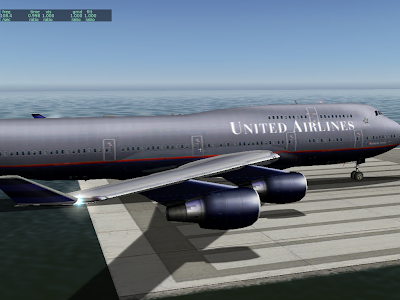
Next we have the same plane in 930 without shaders:
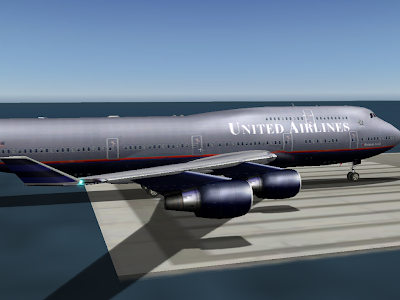
Note the increased brightness on the nacelles and fuselage. What's happening is the hilights are no longer modulated by the texture, so they show up a bit more.
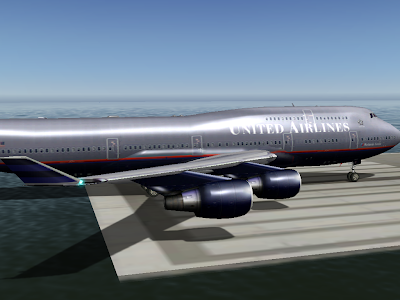
Finally, the plane in 930 with shaders. Now the hilights look smoother and much brighter. This is because the hilights are calculated on a per-pixel basis. Note how the hilights are small - smaller than the triangle size on the engines. We didn't get the full "glare" effect before because the brightest part of the hilight did not land on a vertex at all, and was thus never seen.
Note that the change in specular hilight handling (moving to separate specular hilights) is a bit of a compatibility break. Previously authors could count on not having specular hilights on dark parts of a plane, even if they set the plane to be shiny.
I am not sure how we will ship the final version of 930. I have received very few (none, to be exact) complaints about dark surfaces appearing "too shiny", and a lot of users like the new shiny look.
The alternative to the current scheme (specular hilights are separate by default) is to have this be a selectable feature. Older planes would look the same as they always did, but planes would have to be modified to make them look truly shiny.
- Separate specular hilights. Specular hilights are bright areas on the plane that simualte the refelction of the sun on a shiny surface. X-Plane has had specular hilights for a while (available by the "shiny" check-box in Plane-Maker or ATTR_shiny_rat for an OBJ). What's new is: while previously the hilights were modulated by a texture, they are now independent of the texture. This change means that even a black surface can look shiny now. Before the black surface would "tint" the hilight black, making it invisible. Now we can have a white hilight on a black surface for a glossy look.
- Per-pixel lighting (when shaders are on). Before the lighting calculations were performed on each vertex on a model, then the color from the lighting was interpolated. The problem with this is that if there is a very local lighting effect (like a specular hilight) that is smaller than one triangle, you can't see it (since we can only see the lighting at far apart vertices). With 930, the lighting calculations are done per pixel, making the lighting effects look smoother.

Next we have the same plane in 930 without shaders:

Note the increased brightness on the nacelles and fuselage. What's happening is the hilights are no longer modulated by the texture, so they show up a bit more.

Finally, the plane in 930 with shaders. Now the hilights look smoother and much brighter. This is because the hilights are calculated on a per-pixel basis. Note how the hilights are small - smaller than the triangle size on the engines. We didn't get the full "glare" effect before because the brightest part of the hilight did not land on a vertex at all, and was thus never seen.
Note that the change in specular hilight handling (moving to separate specular hilights) is a bit of a compatibility break. Previously authors could count on not having specular hilights on dark parts of a plane, even if they set the plane to be shiny.
I am not sure how we will ship the final version of 930. I have received very few (none, to be exact) complaints about dark surfaces appearing "too shiny", and a lot of users like the new shiny look.
The alternative to the current scheme (specular hilights are separate by default) is to have this be a selectable feature. Older planes would look the same as they always did, but planes would have to be modified to make them look truly shiny.
Tuesday, February 24, 2009
Hard Object Weirdness (or Don't Count On Bugs)
ATTR_hard is the OBJ attribute that makes the geometry of an object mesh interact with X-Plane's physics engine. ATTR_hard object has a long history of weird behavior, and its behavior in X-Plane 930 is no exception.
The History
- Before X-Plane 815, hard surfaces acted horizontal regardless of the actual OBJ geometry.
- From X-Plane 815-922, sloped hard surfaces work as expected, but vertical hard surfaces do not work. Animation is ignored for hard surfaces.
- Starting with X-Plane 930, animation commands affect hard surfaces. However, vertical surfaces still do not work, and an animated surface does not create friction under the plane.
(In other words, if you put the plane on a platform and move the platform horizontally, the plane will be pulled with the platform due to friction between the platform and the wheels.)
In all of these cases, what we have is a limited implementation that doesn't correctly capture all expected behaviors. Why don't we have a better implementation? There are two factors.
- In some cases a more correct implementation might take significantly more CPU power. It is important that we not raise the CPU requirements of X-Plane mid-version run.
- In some cases, we simply don't have a better implementation coded yet. Remember that X-Plane is primarily a flight simulator. My pilot friends tell me that it is bad form to collide the airplane with anything during flight. So the goal of OBJ collisions is more to detect poor flying than to correctly model the resulting aftermath. X-Plane is not GTA4!
Very simple: don't use it if you can avoid it! I don't mean "don't use ATTR_hard" - it has legitimate uses. Rather I mean: don't depend on the buggy behavior as a feature.
For example, before 930, animation would affect the drawn but not physical OBJ. I would say that given that bug, the only safe thing to do is to not animate hard objects. Animating hard objects to take advantage of the schism between drawing and physics would be assuming that the bug will stay buggy forever.
What Can You Do Now?
In X-Plane 930 hard object animation is a lot better than it used to be, but still not quite correct. The remaining limitations are:
- There is no friction. If you move a platform horizontally, the plane is not dragged along. So you can't really build horizontal elevators. (You can build a platform that moves vertically and move the plane around that way.)
- There is still not support for vertical hard surfaces. Like before, to make a solid "wall", make the wall thick and make the top of the wall hard. But bear in mind that the collision detection in this case is catastrophic; your plane will be heavily damaged by even minor contact with the wall. X-Plane doesn't support horizontal collisions right now.
- Hard surfaces are ignored for vehicles. If you are replacing the car set, don't add hard surfaces - it might turn out that some future implementation does look at them - if that happened, how would you know what the CPU hit is?
Monday, February 23, 2009
VOR Range
It is true that in X-Plane 922, some programmer dialed down the effective range of VORs.
That programmer was me. (This is what happens when you let a non-pilot go poking at the nav code.)
The bug report was that a rather far away VOR could be received on the ground at KSFO; looking at the actual service volume, the notion that this could happen was crazy. I ended up tuning the distance calculation and also the "fudge factor". The fudge factor is the increase in the service volume of VORs in the sim from the listed usable service volume (which is really more like a guaranteed minimum) that lives in the nav.dat file.
Here's the real problem: VOR range has a lot to do with altitude, but X-Plane does not simulate shaped 3-d service volumes. I think we will, but probably not for 930. So for now we have to pick a fudge factor that is large enough to make IFR navigation work without allowing you to receive any VOR from any location.
Beta 3 is still a bit short for VOR range - beta 4 or 5 may improve things a bit.
Note that it is possible to change the service volume of navaids in the nav.dat file. For example, KBOS and KLAX both have extended localizers; the fudge factor for a localizer doesn't have to be 5x to allow KLAX to have a 100 nm final; the nav.dat entry for KLAX includes this special case.
Wednesday, February 18, 2009
When To Cut a Beta
Cutting the next beta is a double-edged sword:
- Any beta that doesn't have known bugs fixed is just not as good as it could be, and is putting buggy code in the field, where those bugs take away from testing.
- Sometimes bugs are severe enough that they occlude other testing (particularly if there is a crash bug).
We did find an intermittent crash during scenery load while flying - that's the kind of thing we need to get into a new beta; we can't tell what else is a real crash until that one gets cleared out of the way.
There is a crash bug that we haven't fixed in beta 3: Austin and I have both seen a single, unreproducible crash during startup on Windows. If you have a crash during startup on Windows, please send a crash_log.txt with your bug report!
Sunday, February 15, 2009
The Dangers of Wandering in the Desert
I have been trying to put documentation on the X-Plane Wiki, and use this blog for announcements and "the inside story", rather than letting the blog turn into a poor-man's users manual. An aircraft developer asked me via email whether there was a blog entry on some of the pitfalls of the v9 panel lighting system. There is not, and the lighting system is under-documented. I will be working on improving the documents over the next few weeks, but the point of this blog entry is: "how did we get here?"
I am a huge fan of incremental software improvement. That's the subject of another blog post (perhaps on another blog), but for now I'll say this: all changes to the rendering engine since version 8.0 have been incremental ones, and yet if you were to look at the code, you wouldn't see a series of band-aids taped on top of each other. Each incremental change leaves the rendering code "fully updated", as if it had been written yesterday. I start each new scenery feature by first reshaping the existing code into the most useful form for what we want to have in the future, and then coding the new feature is relatively simple.
But this strategy has an Achilles heal; if the code being refactored has a public interface (whether it is a file format or programming API), then all of the intermediate steps in the journey become requirements for future products in order to maintain backward compatibility.
This is not a problem as long as the programmer knows where he is going. The danger comes when one of the intermediate steps is actually a step in the wrong direction, and becomes dead weight around a future design.
A Reasonable Progression: OBJ
The OBJ 800 file format has had a reasonable progression* since its birth in version 8. It has gained a number of new features, but each one has generalized and made more powerful previous ideas, such that "legacy behaviors" are not so painful. Some examples:
I have a scenery system to-do list that will last me at least another four years; most of it is filled with things that Sergio has asked for. This to-do list acts as sort of a road map for future scenery system extensions; for any possible OBJ change, I can look at it relative to the other todo items and ask: "is this extension going to play nicely with things to come?"
(As a side note, this is one of the reasons why there are not light maps in any of the X-Plane modeling formats. Light maps don't play well with a number of other scenery system extensions. I want to resolve the conflict between these future additions before they go into the sim.)
Wandering In the Desert
By comparison, the evolution of the panel system in version 9 has been more like wandering in the desert than a straight line toward a goal. Repeatedly, I put features into the panel system without a clear roadmap of where we would end up or how they would work together. The result is what you see now when looking over the panel documents: complexity and chaos.
Basically there are several major changes to the panel system that affect each other in strange ways:
The result is two sources of confusion:
I am open to ideas on how to solve this. I intend to document a "correct formula" for a modern plane, perhaps with tutorials, on the Wiki. I am also considering programming Plane-Maker to flag unusual combinations of features as a warning when saving 930 planes.
Either way, I fear I've learned my lesson from the panel system: incremental improvement of code is only a good idea if the programmer knows where he is going! Next time I will use Google Maps. :-)
* I suppose that whether you think the OBJ 800's evolution has been reasonable depends on your standards for file formats. OBJ 800 absolutely does show growing pains. I would only say: consider the number of revisions and the change in the hardware platform OBJ 800 feeds when you consider its stretch marks.
I am a huge fan of incremental software improvement. That's the subject of another blog post (perhaps on another blog), but for now I'll say this: all changes to the rendering engine since version 8.0 have been incremental ones, and yet if you were to look at the code, you wouldn't see a series of band-aids taped on top of each other. Each incremental change leaves the rendering code "fully updated", as if it had been written yesterday. I start each new scenery feature by first reshaping the existing code into the most useful form for what we want to have in the future, and then coding the new feature is relatively simple.
But this strategy has an Achilles heal; if the code being refactored has a public interface (whether it is a file format or programming API), then all of the intermediate steps in the journey become requirements for future products in order to maintain backward compatibility.
This is not a problem as long as the programmer knows where he is going. The danger comes when one of the intermediate steps is actually a step in the wrong direction, and becomes dead weight around a future design.
A Reasonable Progression: OBJ
The OBJ 800 file format has had a reasonable progression* since its birth in version 8. It has gained a number of new features, but each one has generalized and made more powerful previous ideas, such that "legacy behaviors" are not so painful. Some examples:
- Hard surfaces may now be decks (e.g. you can fly under them) or not, and you can specify what kind of hard surface you have. The original hard surface command was simply "it's hard" or "it's not". But viewed under the lense of the new scenery system, that old hard surface command implicitly implied "the surface is smooth" and "the hard surface is not a deck". So the new hard surface command is a more general version of the old one, which continues to work under the new system.
- Animations in version 9 can be key framed; in version 8 you simply specify start and end values. But start and end values are just like having two key frames. So viewed under the lense of the new scenery system, all animations are key framed; older objects always just have two key frames. The new key framed commands are a more powerful, more general version of the old ones.
I have a scenery system to-do list that will last me at least another four years; most of it is filled with things that Sergio has asked for. This to-do list acts as sort of a road map for future scenery system extensions; for any possible OBJ change, I can look at it relative to the other todo items and ask: "is this extension going to play nicely with things to come?"
(As a side note, this is one of the reasons why there are not light maps in any of the X-Plane modeling formats. Light maps don't play well with a number of other scenery system extensions. I want to resolve the conflict between these future additions before they go into the sim.)
Wandering In the Desert
By comparison, the evolution of the panel system in version 9 has been more like wandering in the desert than a straight line toward a goal. Repeatedly, I put features into the panel system without a clear roadmap of where we would end up or how they would work together. The result is what you see now when looking over the panel documents: complexity and chaos.
Basically there are several major changes to the panel system that affect each other in strange ways:
- A more complex lighting model on the 2-d panel in version 920. (That is, the 3 2-d spot lights, and generic instruments with back-lit, mechanical, or glass lighting.)
- A more complex lighting model in the 3-d cockpit in version 930. (That is, 3-d spot lights, ATTR_cocpkit_region and generic instruments with back-lit, mechanical, or glass lighting.)
- A separate panel used only to provide texture to the 3-d cockpit. (That is, the 3-d panel.)
The result is two sources of confusion:
- Some combinations of features simply don't work together. Since all of the features appear to be independent, I sometimes get bug reports on these. For example, you can't use the 2-d spot lights on the 3-d panel. This is not a bug, it is by design! I will explain why some of these limits exist in future blog posts.
- Among the remaining combinations that do work together, there are a lot of choices about how to structure a plane - too many choices!
I am open to ideas on how to solve this. I intend to document a "correct formula" for a modern plane, perhaps with tutorials, on the Wiki. I am also considering programming Plane-Maker to flag unusual combinations of features as a warning when saving 930 planes.
Either way, I fear I've learned my lesson from the panel system: incremental improvement of code is only a good idea if the programmer knows where he is going! Next time I will use Google Maps. :-)
* I suppose that whether you think the OBJ 800's evolution has been reasonable depends on your standards for file formats. OBJ 800 absolutely does show growing pains. I would only say: consider the number of revisions and the change in the hardware platform OBJ 800 feeds when you consider its stretch marks.
Saturday, February 14, 2009
Scripting: A Line In the Sand
I thought I had already blogged about this, but I can't find the old posts, so here goes. The big question: why can't we have "X" in the OBJ file format or as part of generic instruments?
I get a lot of requests for "more power" in the OBJ or generic instrument system - the ability to play sounds, to do simple math operations on datarefs, more show-hide filters, the ability for a generic instrument to change a dataref in response to another dataref instead of a mouse click.
And invariably I say "No! Go write a plugin!", which I realize is a fairly rude thing to say to a non-programmer. First, let me explain why I say no, and then what we can do about this.
Keeping Systems Separate
These feature requests fall into two broad categories: "systems programming", which is really anything that has a side effect (play a sound, change a dataref, apply some logic), and "visualization" (e.g. a user needs more flexibility to better visualize the sim's state.
I definitely do not want any kind of "systems modeling" code inside OBJs or generic instruments. To give a trivial example: imagine that you could make a generic instrument that would set the generators to on when the landing gear is raised.
What then happens if this generic instrument is off the bottom of the screen when the landing gear is raised? Does the generic instrument get to perform its logic? Both OBJs and generic instruments are fundamentally "visualization" systems - both will short-circuit for performance when they are not visible. If we put systems modeling code into them, then the sim has to evaluate a potentially large number of otherwise unimportant (non-visible) objects and instruments to do system behaviors.
In computer programming, there is the notion of a "model-view-controller" design. The basic idea is to keep the code that changes the model, the model itself, and the code that lets the user see the data model, all separate. Keeping them separate keeps operation consistent - the model does not change its behavior depending on how you look at it, which is very important for consistent simulation.
So for all systems modeling, my answer is always the same: not in viewing code!
Expressions and Visualization
Some requests are simply requests for more visualization complexity - there is only so much you can do with key frames, animation, and a few filters.
I do have to admit that on some level, it is perfectly reasonable to ask for infinite power to visualize data in OBJs and generic instruments.
On the other hand, there would be a real cost to having programming-language complexity in what are otherwise relatively simple-to-use parts of X-Plane (e.g. the simplest model is just an export from ac3d...). My solution for both problems (systems and visualization) is a scripting system, but in the case of visualization, it is about not reinventing the wheel and keeping complexity limited to one place (the scripting system).
Scripting
Plugins have the power to solve all of these problems - they can change almost any aspect of the sim. But they are also very difficult to create; you need to be a programmer who knows a language like C or Pascal, and you need to know how to use the development tool for each platform you want to support. That's a huge amount of specialized knowledge just to customize a few systems.
Basically we need to have a line in the sand. At some point, when the systems to visualize information (OBJ, generic instruments) are not powerful enough, we need to make programming easier, rather than make modeling and authoring more complex.
What we need is a scripting system. The scripting system would provide a relatively simple text-file syntax to do simple scripting of systems and instruments for airplanes.
Such a scripting system should be implemented as an open source plugin; it should not be built into X-Plane. The advantage of this would be:
When a user requests that I add a feature to the generic instrument system, there is an implicit request - that Austin or I take programming time to do the feature. So for now I can only say that if/when I take time to do some of these feature requests, it will be in the form of a scripting system, not as extensions to the generic instrument and OBJ systems. This will give us better long-term compatibility and extensibility (via an open source plugin) and will keep systems modeling code separate from the visualization system.
I get a lot of requests for "more power" in the OBJ or generic instrument system - the ability to play sounds, to do simple math operations on datarefs, more show-hide filters, the ability for a generic instrument to change a dataref in response to another dataref instead of a mouse click.
And invariably I say "No! Go write a plugin!", which I realize is a fairly rude thing to say to a non-programmer. First, let me explain why I say no, and then what we can do about this.
Keeping Systems Separate
These feature requests fall into two broad categories: "systems programming", which is really anything that has a side effect (play a sound, change a dataref, apply some logic), and "visualization" (e.g. a user needs more flexibility to better visualize the sim's state.
I definitely do not want any kind of "systems modeling" code inside OBJs or generic instruments. To give a trivial example: imagine that you could make a generic instrument that would set the generators to on when the landing gear is raised.
What then happens if this generic instrument is off the bottom of the screen when the landing gear is raised? Does the generic instrument get to perform its logic? Both OBJs and generic instruments are fundamentally "visualization" systems - both will short-circuit for performance when they are not visible. If we put systems modeling code into them, then the sim has to evaluate a potentially large number of otherwise unimportant (non-visible) objects and instruments to do system behaviors.
In computer programming, there is the notion of a "model-view-controller" design. The basic idea is to keep the code that changes the model, the model itself, and the code that lets the user see the data model, all separate. Keeping them separate keeps operation consistent - the model does not change its behavior depending on how you look at it, which is very important for consistent simulation.
So for all systems modeling, my answer is always the same: not in viewing code!
Expressions and Visualization
Some requests are simply requests for more visualization complexity - there is only so much you can do with key frames, animation, and a few filters.
I do have to admit that on some level, it is perfectly reasonable to ask for infinite power to visualize data in OBJs and generic instruments.
On the other hand, there would be a real cost to having programming-language complexity in what are otherwise relatively simple-to-use parts of X-Plane (e.g. the simplest model is just an export from ac3d...). My solution for both problems (systems and visualization) is a scripting system, but in the case of visualization, it is about not reinventing the wheel and keeping complexity limited to one place (the scripting system).
Scripting
Plugins have the power to solve all of these problems - they can change almost any aspect of the sim. But they are also very difficult to create; you need to be a programmer who knows a language like C or Pascal, and you need to know how to use the development tool for each platform you want to support. That's a huge amount of specialized knowledge just to customize a few systems.
Basically we need to have a line in the sand. At some point, when the systems to visualize information (OBJ, generic instruments) are not powerful enough, we need to make programming easier, rather than make modeling and authoring more complex.
What we need is a scripting system. The scripting system would provide a relatively simple text-file syntax to do simple scripting of systems and instruments for airplanes.
Such a scripting system should be implemented as an open source plugin; it should not be built into X-Plane. The advantage of this would be:
- Anyone could improve or add features to such a scripting system, not just Austin and myself.
- People could freely customize the scripting system as needed for specific projects.
- By having the code be part of a plugin and not the sim, backward compatibility would be improved - even if the "official" version of the scripting plugin changed, you could always include an older version with your plane that worked exactly the way you want.
When a user requests that I add a feature to the generic instrument system, there is an implicit request - that Austin or I take programming time to do the feature. So for now I can only say that if/when I take time to do some of these feature requests, it will be in the form of a scripting system, not as extensions to the generic instrument and OBJ systems. This will give us better long-term compatibility and extensibility (via an open source plugin) and will keep systems modeling code separate from the visualization system.
Wednesday, February 04, 2009
X-Plane 930 Beta
X-Plane 930 has a lot in it - I will try to cover some of the details of the new features soon, but some immediate thoughts:
- X-Plane betas are open to anyone who wants to participate. You don't have to sign up, you don't have to be approved.
- If you would not be happy with a buggy, broken, weird, freaked out version of X-Plane, do not get the beta! Just wait and enjoy 922 - when 930 is debugged, it will be free for everyone.
- If you make a third party add-on for X-Plane and 930 breaks it...report it, don't fix it! Give us a simple report about how your add-on used to work in 922 and is hosed in 930, and show us where to get the add-on. None of the new features in 930 should break 922 content. Pretty much all of them do nothing until you choose to use them.
- If you make a third party add-on, get on the new betas early; the earlier you report it, the earlier we can fix it.
- Don't release third party add-ons for 930 until 930 goes final. Until 930 is final, all datarefs, SDK features, etc. are subject to change.
- Keep a copy of 922 around if you want to fly during early betas.
- Don't use early 930 betas on critical files - make backup copies!
So if you try the beta and it just blows up...don't panic! Report a bug, and we'll try to get it working for your machine. The pixel shaders and low level video driver setup code have changed, which means working out the kinks on every hardware configuration out there. (Programmers sometimes call this "write once, debug everywhere".)
With that in mind, there's a lot of cool stuff in 930. Better 2-d panel filtering and per-pixel lighting should make the sim look better for just about everyone; other features like 3-d cockpit lighting will be of interest to airplane authors. I will be updating the X-Plane wiki to document how to use some of these new features over the next few days.
Tuesday, February 03, 2009
Catalyst Drivers - Get 9-1
A number of users have confirmed that the new ATI Catalyst 9-1 drivers fix the artifacts introduced with the 8-12 drivers! No need to stay back on the 8-11 drivers any more.
It's nice to have this bug fixed - long time X-Plane users saw this as soon as they updated from 8-11 to 8-12 - they updated drivers and the sim got weird looking, so they just rolled their drivers back.
But a number of MSFS users have tried the X-Plane demo for the first time using 8-12 drivers and wondered how we could ship such a lousy product. The key, of course, is that MSFS uses DirectX drivers, while X-Plane uses OpenGL drivers, so the 8-12 drivers affected X-Plane but not MSFS.
I've been poking at the FRAMEBUFFER_INCOMPLETE messages that some people get. The best I have so far is: run with --no_fbos and --no_glsl (learn how here). If you get this card and you have 2 GB of RAM, consider turning your rendering settings down a bit.
And 930? I got my last beta stopper fixed today, so it's time for a scotch! I'll post more on the beta tomorrow.
Sunday, February 01, 2009
Stuff I'm Looking At
I'm always a little bit nervous about posting grand new initiatives ... if we don't actually do the initiative, invariably someone comes out of the walls later to say that we "promised" a feature that we didn't do. But road maps are important. So, bearing in mind that this is not an official announcement, and that nothing has been decided yet, here are some areas of active investigation:
Another common thread is that these are all open data sharing initiatives. Collaborative data sharing has come a long way since we redesigned the scenery system, starting in version 8.0. My hope is that over the next several months we can make some of these ideas a reality.
But first I have to fix my 930 beta features. :-)
- An airport art asset library. Sergio already started this process by making some aircraft OBJs and other elements (like custom pavement types) available in the libraries that ship with X-Plane. We are looking at extending this over time to include more useful elements for building airports.
- Sharing airport building placements the way we do airport layouts. Right now, airport layouts are shared in a communal database under the GPL license. An airport building database would work the same way - it would be a collection of placements of airport buildings, GPLed and redistributed with X-Plane. The idea would be to make it easy for people to add simple buildings to their local airport and share the results with everyone.
- Using OpenStreetMap (OSM) for roads. We've been looking at OSM for a while, but it's too soon to announce a plan.
- Sharing obstacle data with FlightGear. We already share airport layout data with flight-gear; this would be a similar initiative. We looked at OSM for this, but FlightGear's data needs are a lot closer to ours. This is still in discussion; the FG guys are a sharp bunch, so I think we'll able to work something out.
Another common thread is that these are all open data sharing initiatives. Collaborative data sharing has come a long way since we redesigned the scenery system, starting in version 8.0. My hope is that over the next several months we can make some of these ideas a reality.
But first I have to fix my 930 beta features. :-)
Subscribe to:
Posts (Atom)