Sometimes with X-Plane 850 you may reach your destination airport only to discover that...it's not there! What's going on???
Well, in X-Plane 850 3-d scenery is created while you fly. This includes roads, trees, buildings, and most importantly airports. So...if the flight simulator cannot build 3-d scenery as fast as you fly, you may get to the airport and discover and it's missing. After a while, it will appear. The easiest way to see this is: go to replay mode, so you can easily move a huge distance just by dragging the replay slider. This will "thrash" the 3-d scenery build-up and a bunch of airports will be missing.
There is one exception to the "build-as-you-fly" rule: whenever you do anything that changes the scenery situation from a dialog box, X-Plane says to itself, "well, the user is already not flying, because a dialog box is open...why don't I take the time now and create all the 3-d scenery nearby". So when you place an aircraft at an airport, change certain rendering settings, etc. then the sim builds the airport up front and it will always be there.
I do not yet have a fix to the problem of missing airports. For now I recommend that you consider turning down your 3-d scenery; often a lot of roads or objects can cause the sim to get behind in its 3-d work. I am working on making the code more efficient.
Friday, September 15, 2006

Thursday, September 14, 2006
Beware the GMA950 iMac
Apple has released new iMacs. Previously the iMac was the best X-Plane experience for the dollar among Macintosh hardware offerings. It still is, mostly.
But...the cheapest smallest iMac, at an affordable $999 does not have the kick-ass ATI Radeon X1600 graphics card. Instead it has the, well, ass GMA950 integrated graphics.
If you are looking to buy an iMac and are even going to think about playing X-Plane, buy the more expensive box and get the ATI card. You can't upgrade iMacs, at least not in any way that I've ever heard of, and the GMA950 is never going to perform well.
More importantly, as X-Plane progresses we will take more and more advantage of hardware shaders, and the GMA950 is missing a major set of shaders. So even though the iMac itself is blazingly fast, the video card will simply be unable to show a lot new features.
But...the cheapest smallest iMac, at an affordable $999 does not have the kick-ass ATI Radeon X1600 graphics card. Instead it has the, well, ass GMA950 integrated graphics.
If you are looking to buy an iMac and are even going to think about playing X-Plane, buy the more expensive box and get the ATI card. You can't upgrade iMacs, at least not in any way that I've ever heard of, and the GMA950 is never going to perform well.
More importantly, as X-Plane progresses we will take more and more advantage of hardware shaders, and the GMA950 is missing a major set of shaders. So even though the iMac itself is blazingly fast, the video card will simply be unable to show a lot new features.
Lights and LOD
EDIT FROM 2/19/07: this article mentions some bugs with light visibility from X-Plane 850 betas. These bugs were fixed, and the mechanism of detachment is entirely internal to X-Plane. So please bear in mind when reading this that while this describes the internal engine of X-Plane, you as an author don't need to DO anything special for lights.
One user reported that the taxiway lights are visible a very long way away from the airport. This is true, but it is probably not a cause for concern. By comparison, the airport beacon has a way of disappearing - hopefully less so in beta 11. Here's what's going on:
(When I say "light" in this blog post, I mean the little ball of color that is supposed to simulate the look of a light bulb. "Fixture" refers to the 3-d object modeling the real-world device that holds that bulb in place. The actual rays of light cast are not simulated - that's why the approach lights don't illuminate part of the plane no matter where you fly. Current graphics hardware just doesn't give us that ability yet.)
In X-Plane 850 all "lights" are made via OBJ8 objects. The OBJ8 object may contain both 3-d geomemtry that forms the fixture, and one or more "lights", created via either the LIGHT_NAMED or LIGHT_CUSTOM command. Objects may also have multiple versions based on LOD. If you don't use ATTR_LOD, a single LOD range is assigned by X-Plane based on how big your object is. (Bigger objects will need to be visible farther away.)
Now here's where it gets weird. Some of the lights in an object are "detached" by X-Plane from the OBJ and stored separately in the scenery. We do this for performance - the detached lights can be fed to the graphics card via a different mechanism that is much faster than regular OBJ drawing. One of the effects of light detachment is that the detached lights are no longer limited by the LOD of the object. They instead are drawn to much further distances. The fixtures of the objects, however, are never detached...thus some of the airport light OBJs in X-Plane are only visible to 500 meters. We can get away with such a low distance because the light bulb itself is detached and will remain visible.
So which lights are detached? Well, it depends on a number of factors - lights are only detached if they are not subject to animation and they are simple enough to be drawn in bulk. Which lights are these? It's hard to predict.
So the airport beacon and taxiway light work differently; the taxiway lights are very simple and are detached - hence they are visible a long way away. The airport beacon lights are animated (the light bulbs rotate with the fixture), and are never detached. Thus the airport beacon is subject to LOD constraints and taxiway lights are not.
If you set the world level of detail setting to "low" or "very low" it simply reduces the LOD ranges of all objects. Thus on "very low" the airport beacon may be seen to disappear before the (detached) taxiway lights. For beta 11 I have tried to set the airport beacon LOD large to be enough that even on such low settings the beacon will be visible farther away.
There is one more piece to the puzzle: all lights become dimmer with distance. So in theory our hope is that the lights will become fully dim due to distance before we stop drawing them with LOD, producing a gradual fade-out rather than a sudden disappearance. But if we don't tune all of these parameters right, lights can randomly appear to disappear in the distance instantaniously.
If there's a moral of the story, I'm not sure what it is, except perhaps: this new light system is very new, and I am sure our artists will tune it a bit over the next few versions of X-Plane, helping to hide these implementation artifacts.
One user reported that the taxiway lights are visible a very long way away from the airport. This is true, but it is probably not a cause for concern. By comparison, the airport beacon has a way of disappearing - hopefully less so in beta 11. Here's what's going on:
(When I say "light" in this blog post, I mean the little ball of color that is supposed to simulate the look of a light bulb. "Fixture" refers to the 3-d object modeling the real-world device that holds that bulb in place. The actual rays of light cast are not simulated - that's why the approach lights don't illuminate part of the plane no matter where you fly. Current graphics hardware just doesn't give us that ability yet.)
In X-Plane 850 all "lights" are made via OBJ8 objects. The OBJ8 object may contain both 3-d geomemtry that forms the fixture, and one or more "lights", created via either the LIGHT_NAMED or LIGHT_CUSTOM command. Objects may also have multiple versions based on LOD. If you don't use ATTR_LOD, a single LOD range is assigned by X-Plane based on how big your object is. (Bigger objects will need to be visible farther away.)
Now here's where it gets weird. Some of the lights in an object are "detached" by X-Plane from the OBJ and stored separately in the scenery. We do this for performance - the detached lights can be fed to the graphics card via a different mechanism that is much faster than regular OBJ drawing. One of the effects of light detachment is that the detached lights are no longer limited by the LOD of the object. They instead are drawn to much further distances. The fixtures of the objects, however, are never detached...thus some of the airport light OBJs in X-Plane are only visible to 500 meters. We can get away with such a low distance because the light bulb itself is detached and will remain visible.
So which lights are detached? Well, it depends on a number of factors - lights are only detached if they are not subject to animation and they are simple enough to be drawn in bulk. Which lights are these? It's hard to predict.
So the airport beacon and taxiway light work differently; the taxiway lights are very simple and are detached - hence they are visible a long way away. The airport beacon lights are animated (the light bulbs rotate with the fixture), and are never detached. Thus the airport beacon is subject to LOD constraints and taxiway lights are not.
If you set the world level of detail setting to "low" or "very low" it simply reduces the LOD ranges of all objects. Thus on "very low" the airport beacon may be seen to disappear before the (detached) taxiway lights. For beta 11 I have tried to set the airport beacon LOD large to be enough that even on such low settings the beacon will be visible farther away.
There is one more piece to the puzzle: all lights become dimmer with distance. So in theory our hope is that the lights will become fully dim due to distance before we stop drawing them with LOD, producing a gradual fade-out rather than a sudden disappearance. But if we don't tune all of these parameters right, lights can randomly appear to disappear in the distance instantaniously.
If there's a moral of the story, I'm not sure what it is, except perhaps: this new light system is very new, and I am sure our artists will tune it a bit over the next few versions of X-Plane, helping to hide these implementation artifacts.
Saturday, September 02, 2006
Quick Note: Unstable Formats During Beta!
I just moved into a new house...comcast shows up on Monday (in theory) so until then I won't be posting much or answering email, but a quick note on 850:
The new extensions to the apt.dat format for 850 are not considered final until we go "RC" (releae candidate). So...
...if you are experienting with 850, please expect to have to update your work during beta. If you don't want to change your work please wait until we are RC!
...if you are trying other people's 850 experiments, they may not work if they haven't been updated to the latest X-Plane.
The beta period is definitely experimental. Once we go RC, we'll freeze the format so that third parties can make scenery.
The new extensions to the apt.dat format for 850 are not considered final until we go "RC" (releae candidate). So...
...if you are experienting with 850, please expect to have to update your work during beta. If you don't want to change your work please wait until we are RC!
...if you are trying other people's 850 experiments, they may not work if they haven't been updated to the latest X-Plane.
The beta period is definitely experimental. Once we go RC, we'll freeze the format so that third parties can make scenery.
Saturday, August 19, 2006
A missing PC?
Continuing the thread of hardware and how the market doesn't always provide the machines we want...let's look at Windows.
We've hit a point that people have been saying would come for years: computers aren't getting faster - they're getting cheaper. Technically computers are getting faster, but there are now ultra-low-end Windows machines that aren't much better than what you could get a few years ago. But they are so cheap!
Consider a quick visit to Dell's website. Their cheapest low-end machine is less than $300 with monitor! Insane! It's not much of a machine to a flight-simmer, but it is a 2.5 ghz machine with 256 MB of RAM and an 80 GB hard drive. Put a cheap RAM chip in and that's basically what I got as my flight sim machine a few years ago.
The problem is - to get the price down, the machine's had the parts totally stripped out of it. The graphics are going to be an embedded chipset, probably Intel's, and they're not going to be usable for games. Want a PCIe 16x slot? (Accept no less for a flight simulation machine these days?) I couldn't find a Dell with one of these for less than $650!
Perhaps this makes sense - consider what my MacBook Pro is doing right now and how much of its CPU capacity is used:
- Email: 15%
- Word processing with real-time spell-check: 6%
- Surfing the web: 10-40%
Of course if I go launch X-Plane...
So if I was really talented and could do all three of these things at once, my computer would still be overqualified! For the average person, the sub-$300 computer is just great. It does what they need and is becoming very affordable.
Where things get tricky is when one of those users wants to try X-Plane for the first time. In order to get the price down to $300 Dell has had to cut to the bone on all components. So what we're seeing from users who have new machines is the have's and the have-not's.
The haves have new motherboards with fast memory controllers, large caches, dual core chips, and 16x graphics slots - the card in that slot is usually a monster. (Even last generation's mid-range cards like the 6600GT were very powerful by X-Plane's requirements.) The have-not's have a machine with integrated graphics and no slot to replace them with, very little cache and slower memory controllers.
There isn't really a point to this blog entry...the market is just meeting people's needs. A summary of my observation is: where a rising tide of technology lifted all computers a few years ago, that push is now lowering price instead. As a result, many users have machines that are not way overpowered for their day-to-day work and are thus underpowered when they discover flight simulation.
We've hit a point that people have been saying would come for years: computers aren't getting faster - they're getting cheaper. Technically computers are getting faster, but there are now ultra-low-end Windows machines that aren't much better than what you could get a few years ago. But they are so cheap!
Consider a quick visit to Dell's website. Their cheapest low-end machine is less than $300 with monitor! Insane! It's not much of a machine to a flight-simmer, but it is a 2.5 ghz machine with 256 MB of RAM and an 80 GB hard drive. Put a cheap RAM chip in and that's basically what I got as my flight sim machine a few years ago.
The problem is - to get the price down, the machine's had the parts totally stripped out of it. The graphics are going to be an embedded chipset, probably Intel's, and they're not going to be usable for games. Want a PCIe 16x slot? (Accept no less for a flight simulation machine these days?) I couldn't find a Dell with one of these for less than $650!
Perhaps this makes sense - consider what my MacBook Pro is doing right now and how much of its CPU capacity is used:
- Email: 15%
- Word processing with real-time spell-check: 6%
- Surfing the web: 10-40%
Of course if I go launch X-Plane...
So if I was really talented and could do all three of these things at once, my computer would still be overqualified! For the average person, the sub-$300 computer is just great. It does what they need and is becoming very affordable.
Where things get tricky is when one of those users wants to try X-Plane for the first time. In order to get the price down to $300 Dell has had to cut to the bone on all components. So what we're seeing from users who have new machines is the have's and the have-not's.
The haves have new motherboards with fast memory controllers, large caches, dual core chips, and 16x graphics slots - the card in that slot is usually a monster. (Even last generation's mid-range cards like the 6600GT were very powerful by X-Plane's requirements.) The have-not's have a machine with integrated graphics and no slot to replace them with, very little cache and slower memory controllers.
There isn't really a point to this blog entry...the market is just meeting people's needs. A summary of my observation is: where a rising tide of technology lifted all computers a few years ago, that push is now lowering price instead. As a result, many users have machines that are not way overpowered for their day-to-day work and are thus underpowered when they discover flight simulation.
A missing Mac?
As I catch up on Steve Jobs' keynote for WWDC 2006 (where they announced the new quad Intel Mac Pros) it occurs to me that there's a missing slot in Apple's product line that makes things tricky for X-Plane users.
At this point I wouldn't say that Apple is expensive (they're not cheap, but the internal components aren't cheap either). The problem is finding what you want.
The MacBook and Mac Mini are reasonably affordable, reasonably fast (now that they're Intel-based) and do most things that users want. But both have Intel graphics chips, which make them hopelessly underpowered in the graphics department for X-Plane.
The MacBook Pro and Mac Pro come with great graphics chips and are great high-end products, but clocking in at over $2,000 they're outside the ballpark of what most people will pay for a home computer.
The iMac is probably the best bet for a home flight-sim user. At $1300 it's not too expensive, but it comes with a great graphics chip, is a fast overall computer, and flies the sim real well. The flat screen looks good and it's a nice clean machine to have on your desktop.
What Apple hasn't made (and I suspect never will) is an $800-$1000 desktop with fast graphics and no monitor (a mini pro if you will) and a graphics card in a slot (so it can be upgraded). Such a box would be the best choice for a Mac for flight simulation, but since it doesn't exist the iMac's the next best thing.
To end with a minor rant: the new Mac Pro comes with the nVidia GeForce 7300 GT as one of the options. This isn't a bad card - today's cards are now so fast that even the "low end" ones are fast. (Compare to the 5200FX, which was unusably slow from day one.) But a low-end nVidia card in a $2500 Mac? The previous-generation 6600 GT outperforms it in fill rate and memory bandwidth. This isn't the first time Apple's shipped a big machine with an option for an inappropriately slow graphics card. (I suppose I'm seeing the world from the perspective of a gamer.)
At this point I wouldn't say that Apple is expensive (they're not cheap, but the internal components aren't cheap either). The problem is finding what you want.
The MacBook and Mac Mini are reasonably affordable, reasonably fast (now that they're Intel-based) and do most things that users want. But both have Intel graphics chips, which make them hopelessly underpowered in the graphics department for X-Plane.
The MacBook Pro and Mac Pro come with great graphics chips and are great high-end products, but clocking in at over $2,000 they're outside the ballpark of what most people will pay for a home computer.
The iMac is probably the best bet for a home flight-sim user. At $1300 it's not too expensive, but it comes with a great graphics chip, is a fast overall computer, and flies the sim real well. The flat screen looks good and it's a nice clean machine to have on your desktop.
What Apple hasn't made (and I suspect never will) is an $800-$1000 desktop with fast graphics and no monitor (a mini pro if you will) and a graphics card in a slot (so it can be upgraded). Such a box would be the best choice for a Mac for flight simulation, but since it doesn't exist the iMac's the next best thing.
To end with a minor rant: the new Mac Pro comes with the nVidia GeForce 7300 GT as one of the options. This isn't a bad card - today's cards are now so fast that even the "low end" ones are fast. (Compare to the 5200FX, which was unusably slow from day one.) But a low-end nVidia card in a $2500 Mac? The previous-generation 6600 GT outperforms it in fill rate and memory bandwidth. This isn't the first time Apple's shipped a big machine with an option for an inappropriately slow graphics card. (I suppose I'm seeing the world from the perspective of a gamer.)
Thursday, August 17, 2006
Avoid thrashing pavement types in apt.dat files
In the distant past I blogged about the "crayon rule", that is, thet importance of not changing textures a lot during rendering, and how authors can help X-Plane avoid changing textures.
Before X-Plane 8.50 the sim would change textures every time the pavement changed types in an apt.dat file. So if you have an airport layout that alternates concrete and asphalt pavement (the order in the apt.dat file is the drawing order!) then X-Plane would just switch and switch.
X-Plane 8.50 tries to be smarter about this and detect when it can get away with changing your layout order to reduce texture changes, improving framerate.
Here's my warning: X-Plane is not very smart about this! We try to eliminate unneeded changes but our code isn't that elaborate and it won't optimize as well as you can.
The sure-fire way to improve framerate is to group your layouts by pavement type. This will give you the best framerate. If you have to overlap pavement and control the draw order, I recommend using as few groups of pavement types as possible.
Before X-Plane 8.50 the sim would change textures every time the pavement changed types in an apt.dat file. So if you have an airport layout that alternates concrete and asphalt pavement (the order in the apt.dat file is the drawing order!) then X-Plane would just switch and switch.
X-Plane 8.50 tries to be smarter about this and detect when it can get away with changing your layout order to reduce texture changes, improving framerate.
Here's my warning: X-Plane is not very smart about this! We try to eliminate unneeded changes but our code isn't that elaborate and it won't optimize as well as you can.
The sure-fire way to improve framerate is to group your layouts by pavement type. This will give you the best framerate. If you have to overlap pavement and control the draw order, I recommend using as few groups of pavement types as possible.
Tuesday, August 15, 2006
Taxiway Layouts - positive or negative modeling
X-Plane 850 allows you to model taxiways by cutting holes in pavement, as well as by building up pavement around a hole. In other words, you can make a letter-'O'-like shape by making a circle and then cutting out the center, or by making two semicircles that touch.
Which is better? Here are a few guidelines:
Which is better? Here are a few guidelines:
- Making an area out of smaller pieces is slower in that you must introduce individual lines only to "cut" the area into smaller parts. So generally subdividing your pavement is harmless as long as the cuts can be a few simple straight lines. Using bezier curves or lots of straight segments just to partition an area into smaller parts can slow down frame-rate. So if you're going to partition, keep it simple.
- If you keep your partitioning smple, there's no harm and it does let you control the "grain" of the taxiways textures.
- It takes X-Plane longer to build layouts that have more complex polygons. So subdivision can make airport build-up faster. So for example, modeling an entire class B airport with a single polygon is probably too complex - consider breaking up the polygon a bit.
- It's better to have two adjacent polygon taxiways with more complex boundaries than one polygon on top of the other. X-Plane has to further subdivide polygons based on the topography of the local terrain, and that subdivision happens for every layer of pavement that's overlapped.
- One exception: two edges of polygons that touch and are bezier curves may not line up properly, due to rounding errors. So if you want to have one curved surface over another, you may have to use overlaps.
Monday, August 14, 2006
Error Diagnostics
I got a bug report that Tom Kyler's "Grand Forks" scenery wouldn't load with X-Plane 850. It turns out the apt.dat file has a syntax error that X-Plane 840 silently ignored but X-Plane 850 reports as an error message.
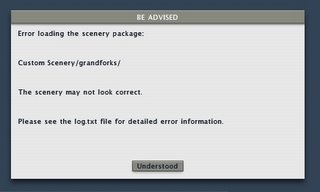 I've wired up the apt.dat loader to use the new, more forgiving error reporting system. Most of the sim still doesn't use this system, but when the sim does, the result is a single dialog box (per scenery package, no matter how many errors) that looks like the image on the left.
X-Plane then logs detailed information about the problem to the log.txt file like this:
***Error with scenery file "Custom Scenery/grandforks/Earth nav data:apt.dat" (/code/design++/HLutils/OOPS_cpp/airp.cpp: 493.)
An apt.dat enumeration is out of range: Invalid beacon code. Expected a code less than 6 but got 343128. Airport is KGFK. File is Custom Scenery/grandforks/Earth nav data:apt.dat.
This way authors can get as much information as we have about the corrupt file while users are not bombarded with technical details. When possible X-Plane will continue to load, but the sim may abort if the file is too badly corrupted.
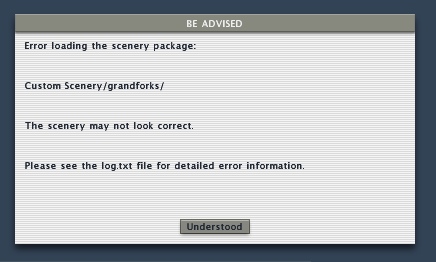 I've wired up the apt.dat loader to use the new, more forgiving error reporting system. Most of the sim still doesn't use this system, but when the sim does, the result is a single dialog box (per scenery package, no matter how many errors) that looks like the image on the left.
X-Plane then logs detailed information about the problem to the log.txt file like this:
***Error with scenery file "Custom Scenery/grandforks/Earth nav data:apt.dat" (/code/design++/HLutils/OOPS_cpp/airp.cpp: 493.)
An apt.dat enumeration is out of range: Invalid beacon code. Expected a code less than 6 but got 343128. Airport is KGFK. File is Custom Scenery/grandforks/Earth nav data:apt.dat.
This way authors can get as much information as we have about the corrupt file while users are not bombarded with technical details. When possible X-Plane will continue to load, but the sim may abort if the file is too badly corrupted.
Sunday, August 13, 2006
I'm back and the sim is still slow - what happened?
I'm back from a week's vacation in the mountains - having access to no digital devices is so refreshing!
We're still working on optimizing the planet code; until this is done we won't have the best possible framerates in 850. So even with beta 7 I think there will still be some improvements we haven't gotten to yet.
We're still working on optimizing the planet code; until this is done we won't have the best possible framerates in 850. So even with beta 7 I think there will still be some improvements we haven't gotten to yet.
Thursday, July 27, 2006
The Guilty Parties (e.g. why 850 is slow for now)
In the past two blogs I described the difference between efficiency and overall speed and the effects of VRAM, textures and objects on scenery. So now we can finally answer the question: why is X-Plane 850 beta 4 slower than X-Plane 840? (And can we fix this?)
The answer is: the biggest single thing slowing down 850 is the orbital rendering of the planet! It turns out that the planet is pretty expensive to draw, and even more so in 8.50. Why is the planet more expensive and why are we drawing it? It turns out that we needed to for the new water reflection textures.
In X-Plane 8.40 you can only see the ground about 25 miles away. This is because we don't have enough scenery loaded to draw any farther out - and if we did it'd be a real drag on framerate. But the sunset goes out to the horizon, which can be a lot more than 25 miles away, even at low altitudes. To address this, we decided to (1) make sure the whole-planet view had the new water as well and (2) draw that planet behind the main scenery to extend the sunsets out to the horizon.
So...X-Plane 850 is drawing the planet all the time (and drawing it with sun-textured water) and that's dragging down the framerate. For the next beta we'll make the planet code smarter so it draws as little planet as possible. This should get back almost all of the framerate 840 had, depending on weather and altitude.
The new water does cost a few fps - the framerate hit is very minor - but you may be able to get some more speed back by turning off "reflections and shadows" in the rendering settings. This
will make the water look like 840 and should bring back a few fps. Like 840, turning off the high-res planet textures rendering setting will also improve framerate a little bit.
So hopefully framerate should be pretty close to full speed in the next beta. There may be other parts of the sim that are slower, but the planet was the big one. But of course be aware of things in the sim now that weren't in the sim before:
The answer is: the biggest single thing slowing down 850 is the orbital rendering of the planet! It turns out that the planet is pretty expensive to draw, and even more so in 8.50. Why is the planet more expensive and why are we drawing it? It turns out that we needed to for the new water reflection textures.
In X-Plane 8.40 you can only see the ground about 25 miles away. This is because we don't have enough scenery loaded to draw any farther out - and if we did it'd be a real drag on framerate. But the sunset goes out to the horizon, which can be a lot more than 25 miles away, even at low altitudes. To address this, we decided to (1) make sure the whole-planet view had the new water as well and (2) draw that planet behind the main scenery to extend the sunsets out to the horizon.
So...X-Plane 850 is drawing the planet all the time (and drawing it with sun-textured water) and that's dragging down the framerate. For the next beta we'll make the planet code smarter so it draws as little planet as possible. This should get back almost all of the framerate 840 had, depending on weather and altitude.
The new water does cost a few fps - the framerate hit is very minor - but you may be able to get some more speed back by turning off "reflections and shadows" in the rendering settings. This
will make the water look like 840 and should bring back a few fps. Like 840, turning off the high-res planet textures rendering setting will also improve framerate a little bit.
So hopefully framerate should be pretty close to full speed in the next beta. There may be other parts of the sim that are slower, but the planet was the big one. But of course be aware of things in the sim now that weren't in the sim before:
- Cars on the roads.
- Flocks of birds.
- Reflective water.
Wednesday, July 26, 2006
X-Plane Framerate and VRAM
When it comes to discussing graphics cards, VRAM always comes up. How much do you need? Is more really better? And why does X-Plane say it is using 300 MB of VRAM at current settings when you only have 64 MB of VRAM on your graphics card? How is this possible?
Well, the short answer is that X-Plane's measure of VRAM is actually mislabeled. But there's more to it than that. (See the bottom for tips for managing VRAM and framerate.)
X-Plane creates two kinds of graphics data for your graphics card: geometry data (the shape of mountains and valleys, buildings, runways and airplanes) and texture data (the raw images that are "painted" onto that geometry, such as grass, water, and airplane liveries).
The amount of texture data X-Plane loads is a function of your texture resolution settings - lower resolution means less texture data. Turning on texure compression also lowers this amount, and adding custom scenery may raise it.
The amount of geometry data X-Plane loads is a function of the number of cars and objects, add-on scenery, and which base meshes you use (new DSFs have more than old ENVs). Turning down the 3-d detail can reduce the amount of geometry data X-Plane has to load.
There are three two places that geometry and texture data can be stored: system memory (the RAM in your computer, on the motherboard) and video memory (VRAM, the memory on your graphics card). VRAM is usually faster than system memory, especially when the graphics card uses it, but there is usually less of it. For example, my Mac has 2048 MB of RAM but only 256 MB of VRAM.
We need one more concept to understand how VRAM and frame-rate relate to each other: the "working set". X-Plane loads a lot of textures when it starts up. But when it draws a frame, it may not need them all. For example, we may load the grass runways texture, but we may not need it if there are no grass runways nearby. The "working set" is all of the geometry and texture data that X-Plane needs to draw the current frame. And since you cannot look at the whole world at once, the working set is usually a lot less than the total data loaded. (For example, as soon as you stop looking at that aircraft carrier because you're flying away from it, the geometry and texture data for the aircraft data are no longer in the working set.)
So putting it all together we can realize that:
So...how much VRAM do you need? Well, X-Plane uses VRAM and system RAM. Anything that is stored in system RAM has to be transfered over your graphics bus (this is your AGP slot or PCIe slot, faster is better, meaning AGP 8x is better than AGP 4x).
This is about to get geeky...skip down a few paragraphs for the practical part.
Basically you need enough VRAM and bus bandwidth (capacity to shovel data from system memory to your graphics card) to handle the entire working set (the stuff X-Plane needs) once per frame.
If I haven't already lost everyone, you could say:
max framerate = bus bandwidth / (working set - VRAM )
So faster bus = faster framerate, and more VRAM = faster framerate. (Math sticklers might ask - if VRAM = working set, is framerate infinite? No...but this equation tells us that if the entire working set fits in VRAM and thus you are not limited by the card fetching data. Other limits on the card will limit your framerate. But this doesn't happen so often as X-Plane's working set on a high-end card with nice settings can be hundreds of MB.)
So you either need more VRAM or a faster bus. In practice, both are good! If you're looking at a new computer, do not settle for anything less than a PCIe16x slot - that's the fastest bus you can get now...less will limit the usefulness of your computer when you try to upgrade.
Generally when you've got more data than VRAM your framerate will be slow - but if you have extra unused VRAM, your framerate will not increase. So what I recommend is: turn down texture resolution (and restart) and check framerate. Once you do this and the framerate does not improve, go back up one notch. This is the highest texture resolution you can run without losing framerate. If you want to go higher, go for it...but you'll pay for it in framerate a bit. Also, turn off FSAA for this test, as it can slow down framerates and make the role of VRAM hard to detect.
(A historical note: in the old days graphics busses were a lot slower than they are now. Remember that everything the card needs that doesn't fit in VRAM has to go over the graphics bus. So...on the old cards if you ran out of VRAM, the sim's framerate really tanked - it could fall down to 2 or 3 fps. But modern machines have much faster graphics busses, so as you run out of VRAM, the framerate get slower but is not totally unusable, becaues the graphics bus can keep up.)
Tips for best framerate:
Well, the short answer is that X-Plane's measure of VRAM is actually mislabeled. But there's more to it than that. (See the bottom for tips for managing VRAM and framerate.)
X-Plane creates two kinds of graphics data for your graphics card: geometry data (the shape of mountains and valleys, buildings, runways and airplanes) and texture data (the raw images that are "painted" onto that geometry, such as grass, water, and airplane liveries).
The amount of texture data X-Plane loads is a function of your texture resolution settings - lower resolution means less texture data. Turning on texure compression also lowers this amount, and adding custom scenery may raise it.
The amount of geometry data X-Plane loads is a function of the number of cars and objects, add-on scenery, and which base meshes you use (new DSFs have more than old ENVs). Turning down the 3-d detail can reduce the amount of geometry data X-Plane has to load.
There are three two places that geometry and texture data can be stored: system memory (the RAM in your computer, on the motherboard) and video memory (VRAM, the memory on your graphics card). VRAM is usually faster than system memory, especially when the graphics card uses it, but there is usually less of it. For example, my Mac has 2048 MB of RAM but only 256 MB of VRAM.
We need one more concept to understand how VRAM and frame-rate relate to each other: the "working set". X-Plane loads a lot of textures when it starts up. But when it draws a frame, it may not need them all. For example, we may load the grass runways texture, but we may not need it if there are no grass runways nearby. The "working set" is all of the geometry and texture data that X-Plane needs to draw the current frame. And since you cannot look at the whole world at once, the working set is usually a lot less than the total data loaded. (For example, as soon as you stop looking at that aircraft carrier because you're flying away from it, the geometry and texture data for the aircraft data are no longer in the working set.)
So putting it all together we can realize that:
- In the rendering settings dialog box X-Plane is reporting the total texture data.
- The rendering settings number is possibly low because it doesn't account for geometry data.
- The rendering settings number is possibly high because not all loaded data is in the working set.
- X-Plane has two sources of memory to work from (VRAM and system RAM), so even if the memory reported by X-Plane was right and bigger than VRAM, system memory would allow us to still run.
So...how much VRAM do you need? Well, X-Plane uses VRAM and system RAM. Anything that is stored in system RAM has to be transfered over your graphics bus (this is your AGP slot or PCIe slot, faster is better, meaning AGP 8x is better than AGP 4x).
This is about to get geeky...skip down a few paragraphs for the practical part.
Basically you need enough VRAM and bus bandwidth (capacity to shovel data from system memory to your graphics card) to handle the entire working set (the stuff X-Plane needs) once per frame.
If I haven't already lost everyone, you could say:
max framerate = bus bandwidth / (working set - VRAM )
So faster bus = faster framerate, and more VRAM = faster framerate. (Math sticklers might ask - if VRAM = working set, is framerate infinite? No...but this equation tells us that if the entire working set fits in VRAM and thus you are not limited by the card fetching data. Other limits on the card will limit your framerate. But this doesn't happen so often as X-Plane's working set on a high-end card with nice settings can be hundreds of MB.)
So you either need more VRAM or a faster bus. In practice, both are good! If you're looking at a new computer, do not settle for anything less than a PCIe16x slot - that's the fastest bus you can get now...less will limit the usefulness of your computer when you try to upgrade.
Generally when you've got more data than VRAM your framerate will be slow - but if you have extra unused VRAM, your framerate will not increase. So what I recommend is: turn down texture resolution (and restart) and check framerate. Once you do this and the framerate does not improve, go back up one notch. This is the highest texture resolution you can run without losing framerate. If you want to go higher, go for it...but you'll pay for it in framerate a bit. Also, turn off FSAA for this test, as it can slow down framerates and make the role of VRAM hard to detect.
(A historical note: in the old days graphics busses were a lot slower than they are now. Remember that everything the card needs that doesn't fit in VRAM has to go over the graphics bus. So...on the old cards if you ran out of VRAM, the sim's framerate really tanked - it could fall down to 2 or 3 fps. But modern machines have much faster graphics busses, so as you run out of VRAM, the framerate get slower but is not totally unusable, becaues the graphics bus can keep up.)
Tips for best framerate:
- Always use texture compression.
- Turn down tex res until framerate doesn't increase, then go up one notch.
- Be sure to buy a card with PCIe 16X!
- If the VRAM listed in the rendering settings is larger then your card's VRAM - don't panic!
Monday, July 24, 2006
X-Plane 850 framerate and efficiency
Austin and Randy and the gang are out at Oshkosh right now - with Austin out of town there won't be a new beta for at least five days. In the meantime I've had some time to look at X-Plane 850's performance and tune the code a bit. (The next beta should be faster than beta 4.) I'll cover performance in a few blog posts because there are a lot of issues.
For today I'll stick to my usual rant: the difference between frame rate and sim efficiency. Simply put:
Sim efficiency is only one of several factors in the equation, but, as a programmer, it is the one I care about most. For every release of X-Plane, I try to measure and confirm that the sim can process scenery at least as efficiently as it used to. If our efficiency goes down, your framerate goes down with nothing in return.
So in looking at the puzzle of low framerate in X-Plane 850, there are two questions we have to answer:
try to keep the framerate the same if you turn on new things that you didn't have before!
We cannot give you something from nothing. If the sim ran at 30 fps with no cars before, it's probably not going to run at 30 fps with cars - cars take time to draw. Some examples of what's new in 850:
Coming up next: the relationship between VRAM usage and framerate.
For today I'll stick to my usual rant: the difference between frame rate and sim efficiency. Simply put:
frame rate = (sim effiency * hardware power) / (visibility * scenery complexity)Basically the sim gets faster with a bigger computer or more efficient code, and it gets slower as visibility goes up or you load more art into it. (By art I mean more complex 3-d models, bigger textures, more complex DSF meshes, more roads, or any other content that looks better but makes the sim do more work.)
Sim efficiency is only one of several factors in the equation, but, as a programmer, it is the one I care about most. For every release of X-Plane, I try to measure and confirm that the sim can process scenery at least as efficiently as it used to. If our efficiency goes down, your framerate goes down with nothing in return.
So in looking at the puzzle of low framerate in X-Plane 850, there are two questions we have to answer:
- Is the sim less efficient than 840? (The answer, BTW, is yes, 850 beta 4 is less efficient, and I am working to fix that now!)
- Does the set of artwork we've included in X-Plane 850 weigh down the sim more than the artwork in 840 when the same rendering settings are used? (The answer is: apparently not or at least not by any significant amount, but more research is needed.)
try to keep the framerate the same if you turn on new things that you didn't have before!
We cannot give you something from nothing. If the sim ran at 30 fps with no cars before, it's probably not going to run at 30 fps with cars - cars take time to draw. Some examples of what's new in 850:
- 3-d structures on all of the runway lights (this can be shut off by disabling textured lights).
- Cars on the roads (controlled in rendering settings).
- Birds flying around (controlled in rendering settings).
Coming up next: the relationship between VRAM usage and framerate.
Wednesday, July 19, 2006
Cars on the wrong side of the road
In the next few betas the cars will drive on the left side of the road for the UK and other countries that do that kind of thing. There are actually two sim changes to make this happen:
- The road.net format allows us to specify where on theh road the cars drive, as a ratio from 0 to 1 (0 = all the way to the left, 1 = all the way to the right). So in the US, all car positions are mor than 0.5 but in the UK less than 0.5.
- The library system now allows you to specify that a given file only be used in certain DSFs by painting a bitmap. So Sergio made a black and white PNG file with the right-side countries in black and left-side countries in white. I made a special road.net with the lanes on the left, and the PNG file controls which road.net gets used (the normal one or special left-side one).
Monday, July 17, 2006
Random Thoughts on 850 beta 1
X-Plane 850 is now beta - see item 7 of Klingon Software Development. A few random thoughts:
We aim to make each new patch of X-Plane "performance positive", meaning for the same settings as the previous version, the new version will run faster. X-Plane 850 is definitely not performance positive right now, but this is mainly because it is an early beta. Expect lower framerates until we have time to do some tuning work and analysis.
X-Plane 850 supports a new apt.dat revision with curved taxiways, lines, etc. However you will not see this in the betas. The reason: the sim supports the data, but we have not yet shipped any new layouts using these features. Until custom scenery authors and layout creators adopt the new features you won't see them in the sim, even though the capability is there. Because we have not yet released editing tools for these new features, it'll be a bit before people can take advantage of them. (You can make curved taxiways now by reading Robin's spec and then using a text editor, but this is a very slow and painful way to make a layout. This is how I have to make taxiways to test the code right now.)
Finally perhaps most important: Austin and I do not have time to follow all of the various on-line forums and communities, so if you post a bug to a forum but don't file a bug report with us, the bug probably won't get fixed! Please use our bug report web page to file bugs with the new beta.
(The bug report web page is for bug reports only. In particular, if you bought X-Plane and are having trouble with it, please email info at x-plane dot com to receive tech support. Filing bugs will probably not get you timely tech support, but emailing our tech support people will.)
We aim to make each new patch of X-Plane "performance positive", meaning for the same settings as the previous version, the new version will run faster. X-Plane 850 is definitely not performance positive right now, but this is mainly because it is an early beta. Expect lower framerates until we have time to do some tuning work and analysis.
X-Plane 850 supports a new apt.dat revision with curved taxiways, lines, etc. However you will not see this in the betas. The reason: the sim supports the data, but we have not yet shipped any new layouts using these features. Until custom scenery authors and layout creators adopt the new features you won't see them in the sim, even though the capability is there. Because we have not yet released editing tools for these new features, it'll be a bit before people can take advantage of them. (You can make curved taxiways now by reading Robin's spec and then using a text editor, but this is a very slow and painful way to make a layout. This is how I have to make taxiways to test the code right now.)
Finally perhaps most important: Austin and I do not have time to follow all of the various on-line forums and communities, so if you post a bug to a forum but don't file a bug report with us, the bug probably won't get fixed! Please use our bug report web page to file bugs with the new beta.
(The bug report web page is for bug reports only. In particular, if you bought X-Plane and are having trouble with it, please email info at x-plane dot com to receive tech support. Filing bugs will probably not get you timely tech support, but emailing our tech support people will.)
Friday, July 07, 2006
Transparent Runways
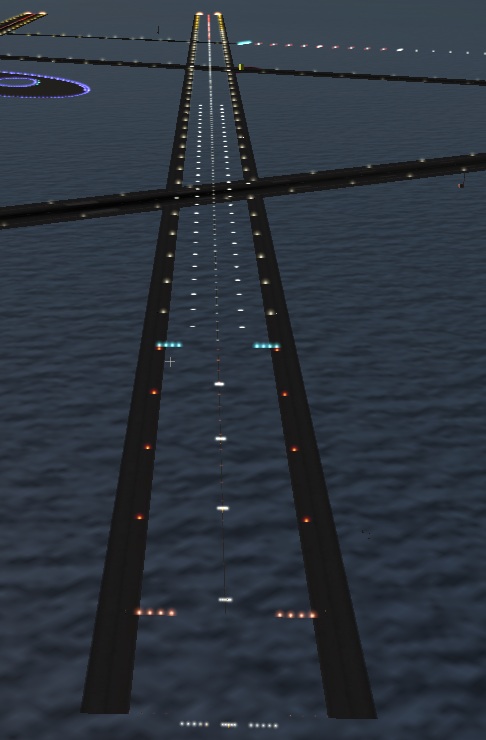 X-Plane 8.50 does all sorts of new things - the picture on the left illustrates "transparent" runways. A transparent runway draws no pavement and does not affect the physics model. But it does have all of the runway lights, signs, and shoulders (if desired).
The purpose of transparent runways is to allow custom scenery to use X-Plane's built-in approach and runway lights while providing your own runway, perhaps via an object with a hard surface.
Technically you could build your own approach and runway lights by hand-placing light objects (from the 850 light library package) onto your runway, but using a transparent runway is a lot easier and probably more reliable in the long-term.
Friday, June 30, 2006
Tools - it'll get worse before it gets better
Here are some musings on the scenery tool situation...first the bad news:
I think 850 will ship with no WorldMaker at all. WorldMaker 8 cannot edit terrain, airport editing is being moved to a separate program, and navaids and fixes are now edited inside X-Plane.
The new scenery tool will probably not be ready by 850 beta 1. I hope to have the first beta of the scenery tool available during the X-Plane 850 beta process - but the scenery tool beta may go on longer.
I am considering 850 airport editing to be higher priority than overlay editing - Jonathan Harris already has a cross-platform overlay editor, but there are no 850 apt.dat editors, so I may release the scenery tool with airports first, then put overlays in later, to get people started with the new airport technology.
Finally the new editor will not be able to save older airport layouts. It will be able to read them, but they will be converted and saved in the new format. If you need to edit old layouts I suggest you use TaxiDraw.
So is there any good news? Well, the main work on the apt.dat format is done, so we'll have a ton of new features for modeling detailed airports. Bezier curved pavement, taxilines, signs
specified by their text, and a whole new lighting system.
Also once 850 ships, scenery tools will be my number one top priority, so I think that while the first few betas of the new scenery tool will be painful and awkward (as we get the basic UI and usability features in place while simultaneously trying to fix X-Plane bugs) I think that we'll pick up a lot of momentum once 850 ships.
Also one note on platforms: the new scenery tool will ship for Mac first, then Windows. I don't have specific plans for Linux, but how soon it happens dependes partly on who I can enlist to help with a port (I don't have a Linux box) and partly on whether it works under WINE (I suspect it may). The whole project will be open-source too so anyone who wants to try to get it working on system X will be able to. With the first beta I should have a "real" source distro, as much as is possible given the development tools I'm using.
I think 850 will ship with no WorldMaker at all. WorldMaker 8 cannot edit terrain, airport editing is being moved to a separate program, and navaids and fixes are now edited inside X-Plane.
The new scenery tool will probably not be ready by 850 beta 1. I hope to have the first beta of the scenery tool available during the X-Plane 850 beta process - but the scenery tool beta may go on longer.
I am considering 850 airport editing to be higher priority than overlay editing - Jonathan Harris already has a cross-platform overlay editor, but there are no 850 apt.dat editors, so I may release the scenery tool with airports first, then put overlays in later, to get people started with the new airport technology.
Finally the new editor will not be able to save older airport layouts. It will be able to read them, but they will be converted and saved in the new format. If you need to edit old layouts I suggest you use TaxiDraw.
So is there any good news? Well, the main work on the apt.dat format is done, so we'll have a ton of new features for modeling detailed airports. Bezier curved pavement, taxilines, signs
specified by their text, and a whole new lighting system.
Also once 850 ships, scenery tools will be my number one top priority, so I think that while the first few betas of the new scenery tool will be painful and awkward (as we get the basic UI and usability features in place while simultaneously trying to fix X-Plane bugs) I think that we'll pick up a lot of momentum once 850 ships.
Also one note on platforms: the new scenery tool will ship for Mac first, then Windows. I don't have specific plans for Linux, but how soon it happens dependes partly on who I can enlist to help with a port (I don't have a Linux box) and partly on whether it works under WINE (I suspect it may). The whole project will be open-source too so anyone who wants to try to get it working on system X will be able to. With the first beta I should have a "real" source distro, as much as is possible given the development tools I'm using.
It's supposed to just work!
X-Plane 8.50 will introduce a new version of the apt.dat file, but it is also designed to support old apt.dat files without any changes. So if you download the 850 beta (not out yet, but soon!) and an apt.dat file that used to work stops working, that's a bug!
If you hit this case, please do not change your apt.dat file to work around the problem - instead please file a bug. A link to our bug reporter can be found on the bottom of this page.
Also OS X 10.4.7 is out and we've received some reports of crashes. So far these appear to be related to custom scenery packages using ENV. If you remove custom scenery and the crash goes away, then please try to identify which scenery package in particular crashes (ideally which ENV file), and then file a bug with that specific package. If we can get a specific package that causes the problem, we'll be able to fix this a lot quicker.
If you hit this case, please do not change your apt.dat file to work around the problem - instead please file a bug. A link to our bug reporter can be found on the bottom of this page.
Also OS X 10.4.7 is out and we've received some reports of crashes. So far these appear to be related to custom scenery packages using ENV. If you remove custom scenery and the crash goes away, then please try to identify which scenery package in particular crashes (ideally which ENV file), and then file a bug with that specific package. If we can get a specific package that causes the problem, we'll be able to fix this a lot quicker.
Wednesday, June 28, 2006
Taxi Signs
Starting with X-Plane 850 (not quite beta yet), the apt.dat file will allow you to build taxiway signs into airport layouts. We're using a simplified version of the sign-specification language from FlightGear (which shares apt.dat data) - you can read the on-going spec/discussion here.
The syntax isn't final, but here's a rough idea of what it will look like:
20 42.363178 -71.012238 110.0 {@R}22R-4L{@@}4L-22R
and here's an example sign (not the same as the apt.dat example listed above):
 The basic idea is: a sign has a latitude and logitude location and a heading (in this case 110, so the front of the sign is visible when parked to the east). The text of the sign is plain text - special characters are put in braces {} and special formatting starts with a @ character. @R turns the sign red, @Y yellow, etc. and @@ changes to the back side of the sign. Arrows are specified with a ^ followed by the direction, so a left-downward arrow is ^ld.
The syntax isn't final, but here's a rough idea of what it will look like:
20 42.363178 -71.012238 110.0 {@R}22R-4L{@@}4L-22R
and here's an example sign (not the same as the apt.dat example listed above):
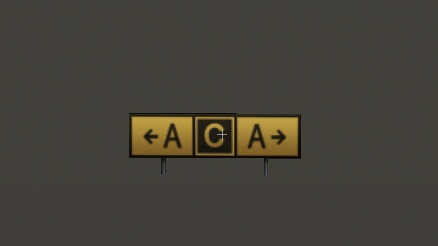 The basic idea is: a sign has a latitude and logitude location and a heading (in this case 110, so the front of the sign is visible when parked to the east). The text of the sign is plain text - special characters are put in braces {} and special formatting starts with a @ character. @R turns the sign red, @Y yellow, etc. and @@ changes to the back side of the sign. Arrows are specified with a ^ followed by the direction, so a left-downward arrow is ^ld.
Monday, June 26, 2006
SPAM - the cure is worse than the disease
Well, the disease is pretty bad too. I spend more time than I'd like to admit to Austin deleting ads for blue pills, credit cards, and dirty websites on the XSquawkBox forums, this bog, my in-box, etc.
Unfortunately one of the side effects of all the spam floating around out there is that anti-spam software is starting to defeat normal communications.
Email is the primary means of communications within Laminar Research and we periodically lose valuable development time when one of us ends up black-listed on an anti-spam list.
Recently I've also been hitting cases where I either can't return an email from a user at all (they can email me but I get spam-filtered when I reply) or the reply requires me to authenticate myself in some way (which takes away from the total volume of email I can answer and makes everyone's responses slower).
So if you have emailed me about scenery and heard nothing it could be my horribly clogged in-box, which is months behind, but it could also be that I emailed you but was a casualty of the war on spam.
Unfortunately one of the side effects of all the spam floating around out there is that anti-spam software is starting to defeat normal communications.
Email is the primary means of communications within Laminar Research and we periodically lose valuable development time when one of us ends up black-listed on an anti-spam list.
Recently I've also been hitting cases where I either can't return an email from a user at all (they can email me but I get spam-filtered when I reply) or the reply requires me to authenticate myself in some way (which takes away from the total volume of email I can answer and makes everyone's responses slower).
So if you have emailed me about scenery and heard nothing it could be my horribly clogged in-box, which is months behind, but it could also be that I emailed you but was a casualty of the war on spam.
Subscribe to:
Posts (Atom)