- Real 3-d lighting in the 3-d cockpit. Note how the map light tends to illuminate only some of the cockpit as it fades out.
- 2-d back-lighting on all of the major steam gauges.
- A bunch of parts can now be dragged in 3-d, including the door handles. This is done via manipulators.
- Walls! In 3-d cockpit viewer mode you won't be able to leave the airplane until you actually open the doors. The cockpit viewpoint is constrained.
- The model has the glass parts separated out for correct shadowing, and the glass works correctly from all viewpoints.
- Panel uses cockpit regions for accurate lighting.
Tuesday, April 28, 2009
A Modern Cessna
With X-Plane 930 beta 8, we finally integrated the latest version of Max's Cessna 172 SP. Grab the new beta and try it - he's added a number of new features that demonstrate some of the newer X-Plane 9 airplane features.

ATTR_light_level Changed!
I have said this before, but now it's finally true: new file specifications are subject to change in the middle of beta!
In particular ATTR_light_level has changed slightly from beta 7 to beta 8. If you are using this feature in your objects, you will need to update your objects.
A new ac3d beta will be posted later today that supports the updated syntax.
You can read about the syntax here.
In particular ATTR_light_level has changed slightly from beta 7 to beta 8. If you are using this feature in your objects, you will need to update your objects.
A new ac3d beta will be posted later today that supports the updated syntax.
You can read about the syntax here.
Friday, April 24, 2009
So How Big of a Mesh Can You Build?
I get asked about the maximum mesh density in X-Plane a lot.


First, I must note that X-Plane's mesh is adaptive - the triangles are not arranged in a grid, but rather they're arranged to maximize the quality of the mesh with minimal triangle count, while preserving the outlines of water bodies and airports. These pictures show a dynamic mesh fit to a section of the grand canyon (both with and without the shaded DEM for reference):
Second, the actual maximum mesh density is almost certainly limited by system resource constraints. The maximum spatial resolution in a DSF is about 0.6 millionths of a foot. You're going to exceed the maximum number of vertices, or much more likely, the maximum amount of available memory in X-Plane long before you have a grid at that resolution.
(That doesn't meant that resolution isn't usable - remember, the idea of the adaptive mesh is to have very high densities in very improtant places, but not everywhere.)
But in practice this is all moot if you don't code your DSFs by hand - the question that really matters is: what is the highest density mesh that you can use with the current scenery tools.
Until recently, MeshTool was limited to a 1201x1201 (90 meter) input DEM. The input DEM is a simple grid, and the finished DEM is never higher resolution than the input. So until now, it would have been just about impossible to make a really high res mesh, even if X-Plane could handle it.
The most recent changes to MeshTool fix this - MeshTool can now handle a 10801 x 10801 (10 meter) input DEM, which X-Plane should be okay with as well.
This new version will hopefully go into beta relatively soon.
Wednesday, April 22, 2009
ATTR_light_level vs. Generic Instruments
Propsman caught something:
...is modifying the value of a batch of ATTR_light_level tris comparable [performance-wise] with toggling the state of a backlit generic instrument? Instinct tells me that you must have the latter more streamlined than the former, but maybe not?
He is right: in the current implementation, ATTR_light_level is probably a bit more expensive than using generic instruments. This may not be true in the future though.
- The generic instrument code is pretty tight.
- Right now ATTR_light_level sometimes has to adjust shaders, which can be expensive.
- In the future, ATTR_light_level has the potential to be very heavily optimized, while the generic instrument code will always be CPU based.
Perhaps other questions are important when picking ATTR_light_level vs. panel texture:
- Which is more useful: to be able to have several variant images and variant images that are not "lights" (this is only possible by generics) or the ability to vary the light level gradually and not just have on or off (this is only possible with ATTR_light_level)?
- Which is simpler to author given the rest of the panel?
Datarefs Vs. Commands IV: Duplication
In my previous posts I have tried to explain the difference between commands and datarefs, and when you might use each. To review:
- A dataref represents information. You can always read it, and you might be able to change it.
- A command represents an action. You can always invoke the action, but you can't tell if it worked without looking at a dataref.
Dataref Vs. Dataref
There is duplication in the datarefs because we don't delete old datarefs when we add newer, improved ones. The old datarefs stay in place to keep old plugins working. Here are a few reasons why we've added new datarefs:
- The
cockpit2/andflightmodel2/sections were added as a new, simpler, easier to use interface for authors in version 9. (Read more here and here and here.) - In some cases, the old dataref was a bit-field while the new one is a simple integer. While plugins can use bitfields, modelers cannot animate using bit fields.
- In some cases, the old dataref did not represent a clean view of the data. Some old datarefs exposed X-Plane internal structures that are not appropriate for long-term use.
sim/cockpit/autopilot/heading_mode. This is the original heading mode, and it is marked deprecated, because it exposes a bunch of internal X-Plane autopilot values.sim/cockpit/autopilot/autopilot_state. This is the ideal autopilot dataref for plugins. It provides all functions, but since it is a bit-field it is not useful for authors.sim/cockpit2/autopilot/heading_mode. This is a clone of the original heading_mode into the cockpit2 domain. Honestly I am not sure how it got there - I know it was me who put it there, but it sure is a dumb idea; the original dataref is deprecated, so it was stupid of me to duplicate it!sim/cockpit2/autopilot/heading_state. This is coming in 930 and provides a heading-state enum set appropriate for authors...basically an enum that matches the two heading bits of the autopilot_state dataref that programmers were using.
- Try to use
sim/cockpit2andsim/flightmodel2when possible. - More recent datarefs are usually better.
- Use the most useful dataref you can find.
Commands Vs. Commands
Sometimes there is some duplication of commands, e.g.
sim/engines/carb_heat_on                           Carb heat on.
sim/engines/carb_heat_off                          Carb heat off.
sim/engines/carb_heat_toggle                       Carb heat toggle.
Here it's a lot more obvious why there are multiple commands: they affect the carb heat in multiple ways. Typically this is done because commands are mapped to joysticks and other USB hardware; some hardware generates a button press when a command is toggled, but some hardware generates two commands, one for the off and one for the on position.
The rule of thumb is: use the command that gives you the action you want.
Commands Vs. Datarefs
Very often there will be a command and a writable dataref. Typically we need them both:
- The command is needed to let users set up their joystick and keyboard.
- The dataref predates version 9 - writing it was the only way to invoke an action.
sim/autopilot/heading that lets us arm heading mode. This command is probably preferable to any of the datarefs for changing the autopilot state.My previous post discusses writing to a dataref. vs. actuating a command in more detail.
Tuesday, April 21, 2009
Datarefs Vs. Commands III: What Is My command Doing?
It turns out that understanding what a command is doing gets really complicated.
The key idea to untangling it all is this:
- Commands have duration, and that duration is the amount of time you "hold down" the button or key that actuates the command.
- Not all commands do things for the entire duration.
An example will clarify this:
- When you press and hold down the 'p' key to pause the sim, the sim pauses (or unpauses) instantly the moment you press the p key. Holding the p key down for a long time does not change this. Pause is a "momentary" command.
- You have to keep the starter button/key held down for a few seconds to start an engine. If you press it and release it, the starter motor will only run for a fraction of a second, which is not enough time to start an aircraft engine. Engine start is a "duration" command.
Virtual Datarefs
A "virtual dataref" isn't really a dataref at all - it's a string you can enter into an OBJ or generic instrument that looks like a dataref, but actually is something else. There is one "set" of virtual datarefs in X-Plane right now.
In X-Plane, you can enter
CMND=some/command/nameinto a generic instrument or obj animation - this creates a "virtual dataref" around the command's "activation status". The virtual dataref acts like a read-only integer-type dataref whose value is 0 if the command is not being pressed right now and 1 if it is.
For example, if you animate a push button using
CMND=sim/starters/engage_starter_1 (key framing the animation to be "out" when the virtual dataref is 0 and 1 when it is in) then you will have a button that appears to be pressed whenever the starters are engaged. This will happen no matter how the starter is engaged - your animation will happen whether the user presses a joystick button, holds down a key, clicks on a manipulator, or a plugin runs the command.Basically, virtual datarefs that provide "activation status" of commands exist so that you can animate the buttons in your virtual cockpit to match what the user is doing with the mouse, keyboard, etc. These datarefs are read-only; use trigger generic instruments and command manipulators to actually run the command.
In that last section I pointed out that a virtual dataref is not a real dataref at least 3 times. Why am I harping on this? Well, programmers, you cannot use XPLMFindDataRef to access virtual datarefs yourself. Sorry.
Virtual datarefs exist to give authors of OBJs and panels access to command activation status, something they would not normally have.
Plugin programmers don't need this - if you are programming a plugin you simply use XPLMRegisterCommandHandler and you will be told when the command is being actuated and released. Using a command handler is a lot more efficient than reading a dataref because you will receive a call only when the command is pressed, instead of having to check the dataref value every frame. If you need to monitor a lot of commands, the callbacks are a lot more efficient.
Command Activation Is Not The Same As System Activation
Let's go back to the case of the "pause" command and review. Here's what we know about the pause command.
- The command
sim/operation/pause_togglewill change the sim's pause state. The instant this command is pressed, the sim will pause (if it is runnning) or unpause (if it is paused). - Holding down the
sim/operation/pause_togglecommand has no effect beyond its initial press. Hold it down for an hour, it doesn't matter. - The virtual dataref
CMND=sim/operation/pause_toggletells you if the pause command is being held down at any instant.
Here's what we know about the pause dataref.
- The dataref sim/time/paused is 1 if the sim is paused, 0 if it is not.
- This dataref cannot be written!
So here's what I mean when I say: command activation is not the same as system activation.
CMND=sim/operation/pause_toggletells you if the pause button is being held down.sim/time/pausedtells you if the sim is actually paused or not.- They are simply not the same!
This becomes important when you start to model the buttons in airplanes. Take for example an autopilot button for altitude hold. In many planes, the button can be pushed in, and the moment you do, the altitude hold "arm" light will turn on. Keep the button held in and it doesn't have any more effect. Altitude hold arm is a momentary command, but it has a system status indicator light.
I receive a number of questions about how to model this - and the answer is: take advantage of the fact that command activation (is the button pushed in) and system activation (is the light on) are not the same.
- You would use a read-only dataref for the autopilot state to turn on the indicator light. (There are two ways to do this: use ATTR_light_level to turn a _LIT texture on and off, or use panel texture and map a generic instrument like a rotary or an annunciator.)
- You would use a command to make the button work. Probably you'd use a command manipulator on the button mesh.
- You would key frame the button's animation based on the virtual dataref wrapped around the command you are using with the manipulator.
The result will be a button that lights up when the AP is armed but pushes in while it is being pressed (whether via the mouse in the 3-d cockpit or a joystick button press or a keyboard button press).
In my final post, I'll comment on how much overlap there is between datarefs and commands.
Monday, April 20, 2009
Datarefs Vs. Commands II: Which One Should I Use?
There is a lot of overlap between the datarefs and commands; very often there is both a dataref (telling information about some part of the sim) and a command (which takes action to change some part of the sim). Which should you use?
Here are some general guidelines:
- If you want to set up a joystick or keyboard, you have to use a command. The joystick and keyboard configuration dialog box lets you associate actions with a keystroke or button press, not information!
- If you need to show the status of a system (E.g. "is the landing gear down") use a dataref. I will cover this issue in more detail in part 3, but basically only datarefs show you information.
The ambiguous case is whether to use a dataref write or a command to change a system when both exist.
- If there is a command that exactly does what you want to do, prefer the command over the dataref. For example, it is better to arm the autopilot using the commands than the datarefs. Changing the autopilot state often involves changing a lot of variables at once in complex ways. When you issue the command, that work is done for you, correctly, every time.
- If the command is not really suitable for your purpose, use a dataref. For example, to change the engine throttle position, do not use the command
sim/engines/throttle_upto move it up "a little bit." Use the datarefsim/cockpit2/engine/actuators/throttle_ratioto set the throttle to the precise position you want. The throttle-up command exists so that users with no joystick or mouse wheel can fly with the keyboard by pressing the F1-F2 keys (bound to throttle-up, throttle-down). It is not meant to precisely control the throttle position!
(I will discuss why there are so much overlap between commands and datarefs in part 4.)
DataRefs Vs. Commands I: What's The Difference
What is the difference between a dataref and a command? They serve different purposes in X-Plane, but it's easy to get them confused, especially because the names can look so similar. If you only take one thing away from this comparison, it should be:
- Datarefs are information.
- Commands are actions.
A dataref is a single bit of published information. For example, the user's indicated airspeed, as seen by the pilot, is a dataref, stored in:
You can always read a dataref, but sometimes you can change it. Trying to change a dataref usually has one of three actions:
A command is an action that the sim can take on your behalf. For example, the command
Like datarefs, commands have permanent names, starting with sim/ for X-Plane or other prefixes for plugins. Commands have been available in X-Plane since version 9.0.
You can always actuate a command, but there is no guarantee that it will do anything. For example, the engine starter command won't start the engine if the plane has electrical starters and the battery is dead.
You can use commands by:
Plugins can add both new datarefs and new commands to the sim. Plugins can also change the behavior of all built-in sim commands, and can change the information in some datarefs.
Where Do I Find Datarefs And Commands
X-Plane's default commands and datarefs are listed in the text files Commands.txt and Datarefs.txt in the Resources/plugins folder. (Note: providing the command list is new to X-Plane 930.) The dataref list is also available on the X-Plane SDK Wiki.
Datarefs have names that do not change. Datarefs made available by X-Plane start with sim/ while datarefs made available by plugins start with another prefix. Datarefs have been in X-Plane since the release of the plugin system in version 6.70.sim/cockpit2/gauges/indicators/airspeed_kts_pilot
You can always read a dataref, but sometimes you can change it. Trying to change a dataref usually has one of three actions:
- If the dataref is not writable at all, nothing happens.
- If the dataref is writable, it will change.
- Sometimes a dataref may be writable, but only after changing some other sim configuration. For example, you can only "write" to the control surface deflection datarefs after setting the control surface override dataref to 1. (If you don't set this override, X-Plane will constantly write its own ideas of the control surface positions to the control surface datarefs and your changes will be lost.)
- With the DataRefEditor plugin (if you just need to find some information).
- Via generic instruments.
- Via OBJ8 animations and manipulators.
- Via a plugin via the XPLMDataAccess APIs.
A command is an action that the sim can take on your behalf. For example, the command
arms the autopilot for altitude hold.sim/autopilot/altitude_arm
Like datarefs, commands have permanent names, starting with sim/ for X-Plane or other prefixes for plugins. Commands have been available in X-Plane since version 9.0.
You can always actuate a command, but there is no guarantee that it will do anything. For example, the engine starter command won't start the engine if the plane has electrical starters and the battery is dead.
You can use commands by:
- Binding them to your joystick and keyboard, in the joystick settings dialog box.
- Using a generic trigger instrument.
- Using a manipulator in an OBJ.
- Using the XPLMUtilties APIs - these are SDK 2.0 features.
Plugins can add both new datarefs and new commands to the sim. Plugins can also change the behavior of all built-in sim commands, and can change the information in some datarefs.
Where Do I Find Datarefs And Commands
X-Plane's default commands and datarefs are listed in the text files Commands.txt and Datarefs.txt in the Resources/plugins folder. (Note: providing the command list is new to X-Plane 930.) The dataref list is also available on the X-Plane SDK Wiki.
Up next: when should I use a command and when should I use a dataref?
Friday, April 03, 2009
The X-Desktop and iPhone Are Not Zero-Sum Games
On the menu this morning: first a whiny rant, then a nerdy one.
Someone pointed me at this post. Before I go into my geeky diatribe about leveraging code, a quick note: it is true that at this point Austin is working heavily on the iPhone - probably more on the iPhone than the desktop. It is also true (but not mentioned) that Laminar is investing more man power into X-Plane for the desktop now than it ever has in the past. (With the iPhone we've grown our workload with a second "front" for products, but we've increased staffing a little bit too.)
It is also true that X-Plane 9 free updates have been less frequent. This doesn't mean there's less code going into them - it just means that we're doing 4-5 months of coding and 3 months of beta instead of 2 months of codindg and 1 month of beta. I'm not sure if this is better or why it is happening (each release has to be individually planned for the circumstances) but one observation:
Given how many video cards and drivers are out there and how they react differently to the X-Plane code, I wouldn't want a beta process less than 2-3 months, because I want to know that it's had time to run on a wide variety of hardware. If our beta has to be at least 2-3 months, then a 3-month release cycle would have us in beta all the time!
My whiny rant (the short version) is this: Laminar Research isn't in a position (as a company selling a product) to post all of the details of how our business operates internally. So posts that say "Laminar should do X" (where X is a business decision) drive me a bit nuts, because I can't post a reasonable reply.
Now here's my real point: development for the desktop and the iPhone are not a zero sum game. Clearly we leveraged the desktop sim to create the iPhone app. But it goes both ways; work on the iPhone also benefits the desktop.
Here is one example: when beta 8 comes out, Plane-Maker's "export to object" will a much more complete OBJ, in OBJ8 format, with animations already in place for things like wing controls surfaces!
That's a feature that people have been asking about for a while - both to make CSL objects* and as a way to save time when moving from a Plane-Maker drawn plane toa custom one. (You would first export an animated OBJ8, then start adding details in a 3-d modeling program. With beta 8, you won't have to rebuild your control surfaces from scratch.)
But...it's also a feature that is critical to the iPhone! The iPhone version of X-Plane uses animated OBJ8 files as well; this feature helped us internally to prepare planes for the iPhone version, but it's also a requested feature from our authors.
So my response to those who say that the iPhone has taken away from X-Plane development is that it is not true - not only because we are developing more heavily for the desktop, but because sometimes iPhone development is for the desktop.
* I do not remember whether the current compiled versions of libXplaneMP use OBJ7 or OBJ8 objects. Since libXplaneMP uses the OBJ code from XPTools, it should be (relatively) straight forward to update libXplaneMP and the clients that use it to use OBJ8 directly. In the meantime, you can use ObjConverter to convert an exported OBJ8 back to OBJ7 for CSL use.
Someone pointed me at this post. Before I go into my geeky diatribe about leveraging code, a quick note: it is true that at this point Austin is working heavily on the iPhone - probably more on the iPhone than the desktop. It is also true (but not mentioned) that Laminar is investing more man power into X-Plane for the desktop now than it ever has in the past. (With the iPhone we've grown our workload with a second "front" for products, but we've increased staffing a little bit too.)
It is also true that X-Plane 9 free updates have been less frequent. This doesn't mean there's less code going into them - it just means that we're doing 4-5 months of coding and 3 months of beta instead of 2 months of codindg and 1 month of beta. I'm not sure if this is better or why it is happening (each release has to be individually planned for the circumstances) but one observation:
Given how many video cards and drivers are out there and how they react differently to the X-Plane code, I wouldn't want a beta process less than 2-3 months, because I want to know that it's had time to run on a wide variety of hardware. If our beta has to be at least 2-3 months, then a 3-month release cycle would have us in beta all the time!
My whiny rant (the short version) is this: Laminar Research isn't in a position (as a company selling a product) to post all of the details of how our business operates internally. So posts that say "Laminar should do X" (where X is a business decision) drive me a bit nuts, because I can't post a reasonable reply.
Now here's my real point: development for the desktop and the iPhone are not a zero sum game. Clearly we leveraged the desktop sim to create the iPhone app. But it goes both ways; work on the iPhone also benefits the desktop.
Here is one example: when beta 8 comes out, Plane-Maker's "export to object" will a much more complete OBJ, in OBJ8 format, with animations already in place for things like wing controls surfaces!
That's a feature that people have been asking about for a while - both to make CSL objects* and as a way to save time when moving from a Plane-Maker drawn plane toa custom one. (You would first export an animated OBJ8, then start adding details in a 3-d modeling program. With beta 8, you won't have to rebuild your control surfaces from scratch.)
But...it's also a feature that is critical to the iPhone! The iPhone version of X-Plane uses animated OBJ8 files as well; this feature helped us internally to prepare planes for the iPhone version, but it's also a requested feature from our authors.
So my response to those who say that the iPhone has taken away from X-Plane development is that it is not true - not only because we are developing more heavily for the desktop, but because sometimes iPhone development is for the desktop.
* I do not remember whether the current compiled versions of libXplaneMP use OBJ7 or OBJ8 objects. Since libXplaneMP uses the OBJ code from XPTools, it should be (relatively) straight forward to update libXplaneMP and the clients that use it to use OBJ8 directly. In the meantime, you can use ObjConverter to convert an exported OBJ8 back to OBJ7 for CSL use.
Wednesday, April 01, 2009
Scenery Tools Progress? Yes.
I've been hacking at the scenery tools over the last few days...and I think we're making some progress. I mention this because it can be hard to see the work getting done - there is nothing for months, then a new version of a tool. (Well, now you can watch the code change as it happens. If you don't think this like watching paint dry, you might be a geek!) I also mention it because two of the biggest improvements aren't my own - they're insanely helpful user contributions.
The AC3D Plugin
Version 3.2 is now in beta. Version 3.2 catches the plugin up with all of the latest OBJ tricks, including dataref-controlled LIT levels, manipulators, hard surfaces, etc. This might be more useful for airplane modelers than scenery modelers, but I think the variable _LIT channels can be used for some interesting scenery effects too.
WorldEditor
WED 1.1 will go beta once X-Plane 930 is out of beta, and will feature (very primitive) overlay editing. It's not a thing of beauty (yet) - the overlay editing features are leaner than the airport editing tools were. But 1.1 will allow you to edit an overlay and airport in one workspace.
I can tell you now that the area where WED 1.1 is weak is preview. But I don't want to hold off the ability to edit overlays in WED "at all" just because it's not as nice as it could be (and someday will be).
It should be possible to work on an overlay project in both WED and OverlayEditor - for example, you could build a taxiway layout in WED, using the overlay capabilities for custom pavement and lines, but use OverlayEditor to place 3-d objects (with a 3-d view).
MeshTool
To be blunt, MeshTool in its current form is really hard to use. Part of that is expected - MeshTool is a "back-end" tool like DSF2Text, aimed to simplify the problem of creating base a base mesh for some other program. But even as a back-end, MeshTool is difficult to use because it has bugs in its polygon processing, which often result in cryptic and hard-to-diagnose crashes when used with even relatively simple input data.
The good news is that I have my base mesh generation code running with a new polygon processing library (CGAL) - the switchover from my old buggy code to CGAL was done by Andrew and contributed back as a patch. I've been throwing all sorts of weird data at the polygon cutting algorithms and they are rock solid.
The mesh generation code is part of MeshTool, so the next build of MeshTool will feature these processing improvements. That's where Janos' extensive work on the build environment comes in - he's basically turned the scenery code from a big pile of my mad ramblings into a sane multi-platform project. This will mean a much simpler, faster process for releasing tools, particularly on Windows and Linux.
(Previously once I got a tool working, I would have to waste a few days trying to get the code to work on Windows too, slowing the whole process down.)
I expect to recut the "scenery tool" pack (that is, MeshTool, DSF2Text, and all of those other smaller apps) some time during WED beta, after 930 goes final. If all goes well, there should be native versions of the command-line tools for Linux.
MeshTool Needs a UI
Fixing MeshTool's polygon processing is necessary, but not at all sufficient to make it a useful tool; to be really useful, it needs a real user interface. I think there are two strong possibilities for this:
- WED could develop base mesh editing. Under this scheme, you would be able to draw land use polygons in WED and create a "DEM" object for the elevation.
- MeshTool could be an output option for QGIS (via some kind of plugin or script).
Tuesday, March 31, 2009
The New Ac3d Export Plugin (Beta 1) - You Must Update Your .AC file!
I just posted the new X-Plane AC3D plugin (3.2 beta 1). For the info, please subscribe to the x-plane-scenery yahoo mailing list. I will post links on the scenery website once the plugin has undergone more testing; during early beta I only need a few testers to tell me I broke things.
Please read the README that comes with the download completely!
An important note for anyone using an existing .ac file to make airplanes with panels:
The new plugin gives you direct control over manipulations. But older .ac files don't have the manipulator set on any of the objects. Thus if you export your airplane, your panel texture will work, but the panel will not be clickable.
To fix this, for each object in the hierarchy that has panel texture, select the object, open the X-Plane Object Properties... dialog box, and change the manipulator from "None" to "Panel". (If you don't see this option, make your properties window a bit taller.)
Note that if you don't need your panel to be clickable, setting the manipulator to "none" is slightly faster in X-Plane 930 and a lot faster in X-Plane 922.
Other details: you'll need the Commands.txt and DataRefs.txt file from X-Plane's Resources/plugins folder.
Panel sub-regions are now handled quite a bit differently - please be sure to read the README completely. If you were using the 3.1 plugin with panel regions, you may need to update your .ac file a bit.
Please read the README that comes with the download completely!
An important note for anyone using an existing .ac file to make airplanes with panels:
The new plugin gives you direct control over manipulations. But older .ac files don't have the manipulator set on any of the objects. Thus if you export your airplane, your panel texture will work, but the panel will not be clickable.
To fix this, for each object in the hierarchy that has panel texture, select the object, open the X-Plane Object Properties... dialog box, and change the manipulator from "None" to "Panel". (If you don't see this option, make your properties window a bit taller.)
Note that if you don't need your panel to be clickable, setting the manipulator to "none" is slightly faster in X-Plane 930 and a lot faster in X-Plane 922.
Other details: you'll need the Commands.txt and DataRefs.txt file from X-Plane's Resources/plugins folder.
Panel sub-regions are now handled quite a bit differently - please be sure to read the README completely. If you were using the 3.1 plugin with panel regions, you may need to update your .ac file a bit.
Friday, March 27, 2009
A Bit More Open Source
Thanks to Janos ("sothis" on the .org) we now have a GIT repository of the scenery tools, with public browsing of the scenery tools code.
(Non-programmers - this basically means that source code updates for the scenery tools will now be available every hour, rather than every now and then when I get around to it. The rest of this post is for programmers.)
The X-Plane tools code have always been open source, in that the LR-created code is distributed under the MIT/X11 license (which basically says "do whatever you want, don't sue us"). The public repository makes the process of getting the code a lot simpler:
- The master code is actually in CVS, but this public GIT repository is updated from CVS once an hour, so this code is very close to the latest we have.
- The full version history, tags, and other information that might be useful to a programmer are all present.
- The web interface supports online browsing of the code, as well as downloading a "snapshot" of the entire tree (as a zip, gz, or bz2 file).
(Git users will note that most of my checkin comments are really lame. This is a bad habit that comes from using CVS too much. CVS's checkin comments are per-file, not per-group, which makes them somewhat useless to search on. Typically CVS users rely heavily on tags. The bridge from CVS to git tries to group them into a single commit, which helps reveal the actions taken on the source code.)
Thursday, March 26, 2009
Standards Aren't Standards During Beta
In particular, when a new spec is being developed, during beta it may change. (During a beta of a future version, old specs won't change.)
So...please do not release non-beta aircraft and scenery based on beta builds like 930.
Here's an example: the current spec for attached objects is that the draw order is based first on lighting mode, then on the order listed in Plane-Maker.
It turns out that if we do that, polygon offset can't be used in a number of weird cases. So the rules will have to change. I'm not sure what they will change to, but the decision will be finalized when 930 is finalized.
Wednesday, March 25, 2009
Why Can't I Mark My Object As "Extreme Resolution"
I receive a number of requests from authors for an attribute to tag an object as "needs maximum texture resolution" or "needs compression disabled" or "needs maximum anisotropic filtering". The general idea is that the author wants to ensure a viewing environment that looks good.
For the most part, I am against these ideas - think of the two cases:
- If the attribute on the content is request for a relative improvement in resolution (e.g. set my object to one texture res higher than the rest of the world) then what we'll have is an arms race - every author will set their content with this flag, and the result will be that the entire sim tends to run at one res setting higher than expected. The result: users without enough VRAM will turn their res settings down another notch and all the content will look like it did before.
- If the attribute on the content is a request for an absolute setting (e.g. load this texture at the highest resolution possible) some content will simply not run on some computers that do run X-Plane.
That's a simplification of the issue - in fact I am sympathetic to the notion of differential settings - that is, we need to use more texture resolution for art elements that are closer to the viewer. The sim already improves airplane resolution a bit and cockpit resolution a lot. We set anisotropic filtering a bit higher on runways because they are viewed from a shallow view angle pretty much all the time during normal flight.
At this point I am looking at some more specific overrides for cockpit objects. In particular, modern cockpits are built out of many attached objects, and not just the "cockpit object" itself - reducing the resolution of these objects can make cockpit labels illegible.
If we do get extensions to improve resolution I can only say this: use them very, very sparingly! Adding the extension doesn't improve the user's hardware. If the user had the ability to run your airplane at extreme res without compression and 16x anisotropic filtering, he'd already be doing that!
Friday, March 20, 2009
The Mathematics of Field of View and Vanishing Points
In order to understand the vanishing point in Plane-Maker, we first have to look at field of view and the process by which X-Plane simulates a 3-d world on a 2-d monitor.
Field of View
Field of View is the angle that you get if you go from the left edge of your vision to your eye, then back up the right edge. In the case of a monitor, we can calculate this (depending on how far back I am sitting). For example, my 19" LCD is 14.8 inches across the top; to have a 45 degree FOV I need to sit about 17.8 inches away from the monitor.
X-Plane lets you set the field of view. Imagine that you were sitting in front of a window on an airplane. As you put your face closer to the window, you can see more of the world outside. Effectively you are increasing your field of view. X-Plane works the same way - turning up the field of view parameter will increase the amount of "stuff" you can see.
Where Is The Horizon?
So where is the horizon? The answer is: it depends. Assuming you are looking straight forward, the most logical place to put the horizon is exactly half-way up the monitor. And this is what X-Plane does in any external view.
As you rotate your head up and down, the center of your vision changes relative to the horizon. But if you simply move your head up and down, the horizon doesn't move. This is due to parallax. The closer an object is, the more it moves as you move your head. This is what lets me look "over" the dashboard of the car by sitting on a phone book: as my head goes higher, the dash board (close) appears a lot lower but the road (far) appears only a little bit lower. The horizon (very, very far away) doesn't move at all.
This effect works in X-Plane. Try moving the view point up and down in a plane with a full 3-d cockpit, like the Cessna 172. As you move your head up and down, your ability to see the runway out the window will change.
2-D Panels
Things get weirder when we have a 2-d panel. A 2-d panel is sort of a flat image of what a 3-d cockpit might look like. We need some kind of correlation between the 2-d world and 3-d world...that is, where does the horizon appear through this 2-d panel. That location is the "vanishing point" in Plane-Maker.
Here's where things get strange: what do we do when we scroll the panel? Do we move our head or tilt our head? The answer is: neither. Scrolling the 2-d panel simply scrolls the "window" within the 3-d world that we look through. This has the effect of moving the horizon (by the exact number of pixels the panel scrolled) without rotating your view point.
This isn't necessarily the best way to scroll the panel, but it looks pretty good, and anything we do with 2-d panels is going to be an approximation.
And Now The Bug
Of course, there must be a bug in here somewhere...these blog posts are usually the result of an investigation into an edge-case in the sim. In X-Plane 930b6, we pick a vanishing point based on the 2-d panel when we are in 3-d cockpit mode.
Why would we do such a silly thing? Originally it was to keep the horizon from jumping when there is no 3-d cockpit object. This behavior is okay in that case, but here's how we get burned: if the 2-d cockpit has to scroll, the vanishing point might be off the top of the screen. Authors who have made very large 2-d panels and separate 3-d cockpits see this as the 3-d viewpoint being stuck straight down. What's happening is the vanishing point (and thus the center for the mouse) are off the top of the screen.
For beta 7 I am fixing this:
- If there is a 3-d cockpit object, the vanishing point will be the center of the screen, which is almost certainly the right thing to do for a real fully 3-d view.
- If there is no 3-d cockpit object (but instead X-Plane's default of the 2-d panel floating in space) the vanishing point will match the 2-d view, but taking the default scroll position into account. This should keep the horizon at a reasonably sane point.
Thursday, March 19, 2009
Beta 6: Cockpit Chaos
The code that decides what parts of the plane get drawn in what views is, to put it midly, byzantine. The code evolved, and in this process became more complex and convoluted.
One of the side effects was a series of bugs that couldn't easily be fixed - typically it was a case where some new piece of code had to do some drawing, but the decisions on how to draw were being made by legacy code that had no business making those decisions.
So for beta 6 I rewrote that code.
Here's what this means: if your airplane starts showing the wrong "stuff" in various views in beta 6, please send me the plane, and a description of what it does in 922 and 930b6.
The risk is that I may have missed some of the quirkier behaviors that 922 was capable of. My goal is to have 922's behavior, but with clean code. So if things changed, please let me know!
Object Materials - The Crayon Rule Lives On Forever
Let me just clarify one thing about yesterday's post on materials: the new material system will let authors edit material parameters like shininess; it will not let the user change textures.
Objects will continue to require texture atlasing (that is, the use of one texture set with the individual images combined). Inside the company, we call this the "crayon rule" - Austin's original analogy to explain atlasing to our art team was that you draw slower if you spend all your time putting a crayon back in the box and taking a new one out.
So materials will let you change some macro-parameters of how the object is drawn, but not swap out the texture.
Objects will continue to require texture atlasing (that is, the use of one texture set with the individual images combined). Inside the company, we call this the "crayon rule" - Austin's original analogy to explain atlasing to our art team was that you draw slower if you spend all your time putting a crayon back in the box and taking a new one out.
So materials will let you change some macro-parameters of how the object is drawn, but not swap out the texture.
Wednesday, March 18, 2009
Object Materials - Some Rough Thoughts
First, we're not going to get an OBJ materials model in 930. 930 is crammed full of stuff, and I don't want to add anything more! I am not sure when we'll get OBJ materials, or even if this is how it will go down. But this is what I am thinking:
- Materials will be controlled on the "batch" level, that is, by using ATTRibutes. You'll be able to change materials mid-object.
- Materials will be grouped into "material classes" - the material class will be mutually exclusive. So if we have a metal material class and a "plastic" material class, you won't be able to combine them.
- There will be some kind of material class that corresponds to the current behavior, and all of the existing attributes will keep working; probably there will be a newer, cleaner way to state in an OBJ what you can already do now.
- You will set all material class parameters at once. This simplifies the syntax and assures that we don't have any strange mix & match combinations.
I do not yet know how normal and gloss maps fit in. Normal maps may be useful to multiple material classes; gloss maps are somewhat material class specific (in that if a material class has no concept of gloss, the gloss map is moot). It is definitely advantageous to pack a normal map and gloss map into a single texture (a la blender).
The main point of material classes is to create the infrastructure for complex extensions to the material system in a clean way. Adding additional attributes creates an NxN problem - for each new attribute I add, I have to consider how it interacts with every other attribute. By comparison, a new material class by definition shuts all other material classes off.
Wednesday, March 04, 2009
Back-Lighting For All Instruments
X-Plane 930 beta 4 will be out real soon, and it has a somewhat significant new instrument feature: all instruments (not just generic instruments) can have additive lighting.
But wait - what is additive lighting? Additive lighting is the basic equation X-Plane uses for "lit" stuff. Basically it says that the _LIT texture is added to the daytime texture to simulate the effect of an object that reflects sun light and emits its own light. Here's a more detailed description.
It used to be that the _LIT textures for instrument overlays were used instead of the daytime ones at night. Generic instruments introduced a new lighting mode, "back-lit", where the LIT texture is added to the daytime texture. This lets you make an instrument that has a light behind it to illuminate the markings at night.
In particular, when an instrument is back-lit, the amount of LIT texture added in is a function of the instrument light levels (the pilot can turn this up and down) while the amount of day time texture is a function of the sun and spot light shining on the area.
Originally I did not want to extend the legacy instruments to support back-lit lighting. What finally made me change my mind was the amount of detail in some of the standard mechanical instruments. As an exercise, I converted the six pack and nav instruments of Max's default Cessna to generic instruments.
The conversion required a lot of new (and very weird) datarefs, some esoteric extensions to the generic needle instrument, and it lacked some of the finesse of Austin's built-in instruments. All of these problems stem from one limitation: the animation action of generic instruments cannot be nested.
(Of course there is a practical consideration too - for an author with legacy instruments, rebuilding with generics takes time. Typically it took about 4-6 generics to model each built-in instrument in the six pack. The conversion only took me about eight hours, but I have access to the source code of the built-in instruments, a luxury authors would not be able to leverage.)
So in the long term, I am at least investigating the notion of nested animations and movements for generic instruments; I think that this would be the final flexibility needed to model just about anything with generic instruments.
But for the short term, you can back-light your built-in instruments; just set the lighting mode to "additive" and create the LIT textures.
Thursday, February 26, 2009
Separate Specular Hilites and Per-Pixel Lighting
A number of users have commented that the X-Plane 930 betas looks "shinier" than before. There are actually two separate features going on :
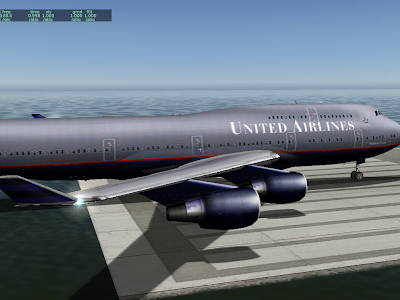
Next we have the same plane in 930 without shaders:
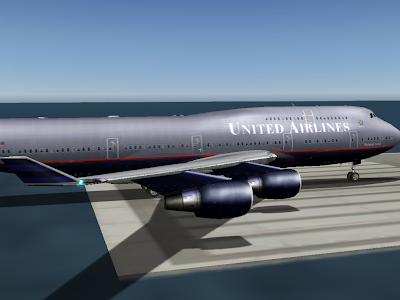
Note the increased brightness on the nacelles and fuselage. What's happening is the hilights are no longer modulated by the texture, so they show up a bit more.
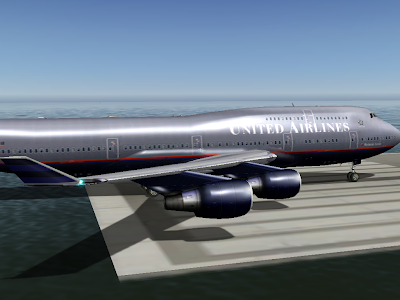
Finally, the plane in 930 with shaders. Now the hilights look smoother and much brighter. This is because the hilights are calculated on a per-pixel basis. Note how the hilights are small - smaller than the triangle size on the engines. We didn't get the full "glare" effect before because the brightest part of the hilight did not land on a vertex at all, and was thus never seen.
Note that the change in specular hilight handling (moving to separate specular hilights) is a bit of a compatibility break. Previously authors could count on not having specular hilights on dark parts of a plane, even if they set the plane to be shiny.
I am not sure how we will ship the final version of 930. I have received very few (none, to be exact) complaints about dark surfaces appearing "too shiny", and a lot of users like the new shiny look.
The alternative to the current scheme (specular hilights are separate by default) is to have this be a selectable feature. Older planes would look the same as they always did, but planes would have to be modified to make them look truly shiny.
- Separate specular hilights. Specular hilights are bright areas on the plane that simualte the refelction of the sun on a shiny surface. X-Plane has had specular hilights for a while (available by the "shiny" check-box in Plane-Maker or ATTR_shiny_rat for an OBJ). What's new is: while previously the hilights were modulated by a texture, they are now independent of the texture. This change means that even a black surface can look shiny now. Before the black surface would "tint" the hilight black, making it invisible. Now we can have a white hilight on a black surface for a glossy look.
- Per-pixel lighting (when shaders are on). Before the lighting calculations were performed on each vertex on a model, then the color from the lighting was interpolated. The problem with this is that if there is a very local lighting effect (like a specular hilight) that is smaller than one triangle, you can't see it (since we can only see the lighting at far apart vertices). With 930, the lighting calculations are done per pixel, making the lighting effects look smoother.

Next we have the same plane in 930 without shaders:

Note the increased brightness on the nacelles and fuselage. What's happening is the hilights are no longer modulated by the texture, so they show up a bit more.

Finally, the plane in 930 with shaders. Now the hilights look smoother and much brighter. This is because the hilights are calculated on a per-pixel basis. Note how the hilights are small - smaller than the triangle size on the engines. We didn't get the full "glare" effect before because the brightest part of the hilight did not land on a vertex at all, and was thus never seen.
Note that the change in specular hilight handling (moving to separate specular hilights) is a bit of a compatibility break. Previously authors could count on not having specular hilights on dark parts of a plane, even if they set the plane to be shiny.
I am not sure how we will ship the final version of 930. I have received very few (none, to be exact) complaints about dark surfaces appearing "too shiny", and a lot of users like the new shiny look.
The alternative to the current scheme (specular hilights are separate by default) is to have this be a selectable feature. Older planes would look the same as they always did, but planes would have to be modified to make them look truly shiny.
Subscribe to:
Posts (Atom)